LangChain(三)——Data Connection

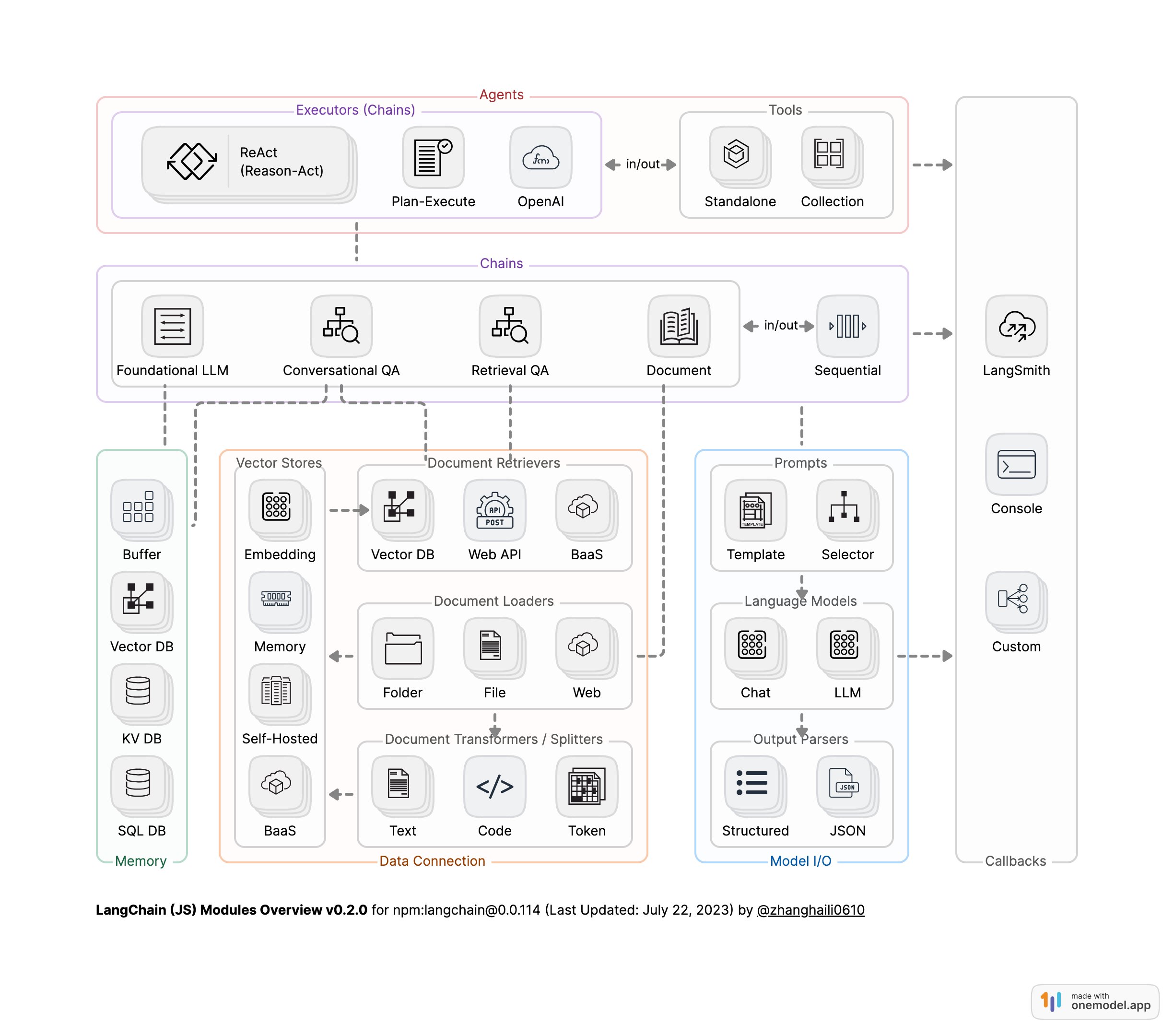
LangChain模块架构图 [1]

一、Retrieval简介

  • Document Loaders:从不同的源加载文档
  • Document Transformers:拆分文档,删除冗余文档等
  • Embedding Models:获取结构化文本并将其转化为向量数据
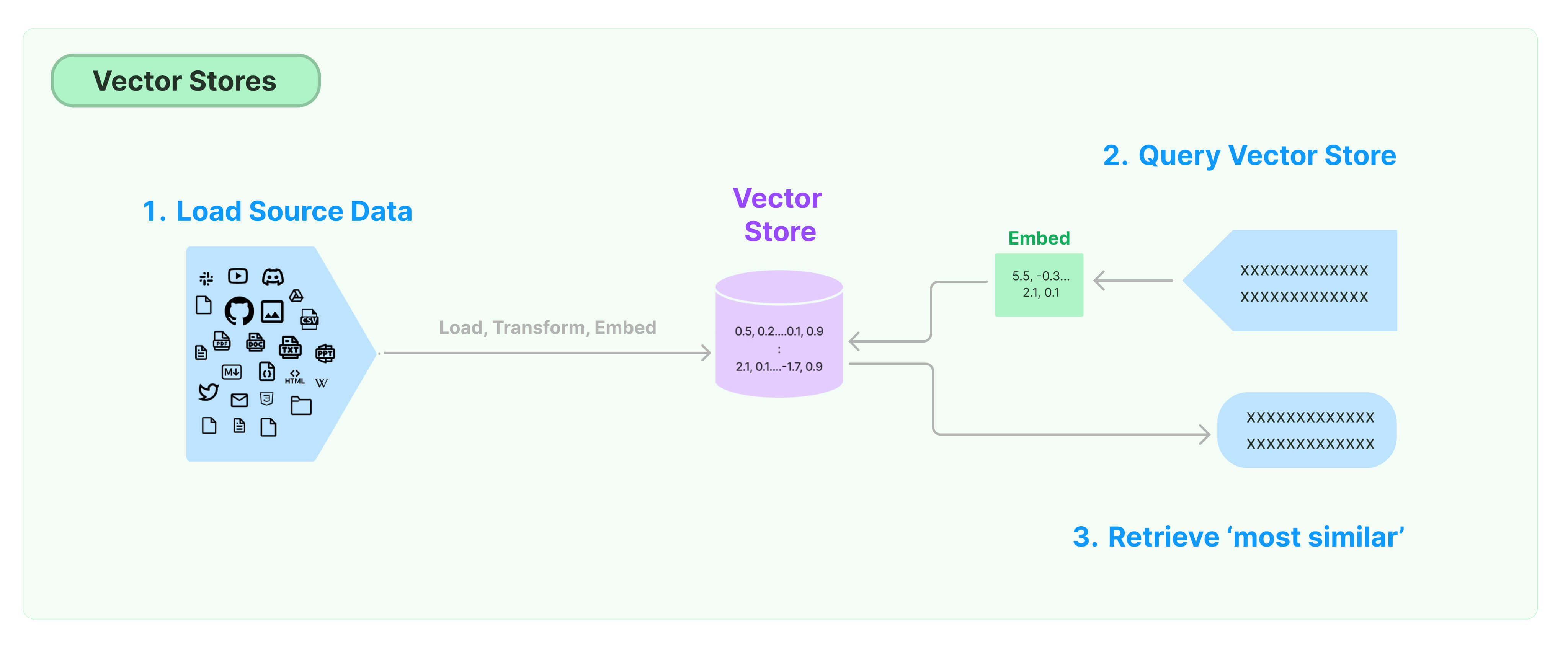
  • Vector Stores:存储和搜索向量数据
  • Retrievers:从Vector Stores和其他数据源查询数据
  • Indexing: 将来自任何来源的文档加载并保持与向量存储的同步

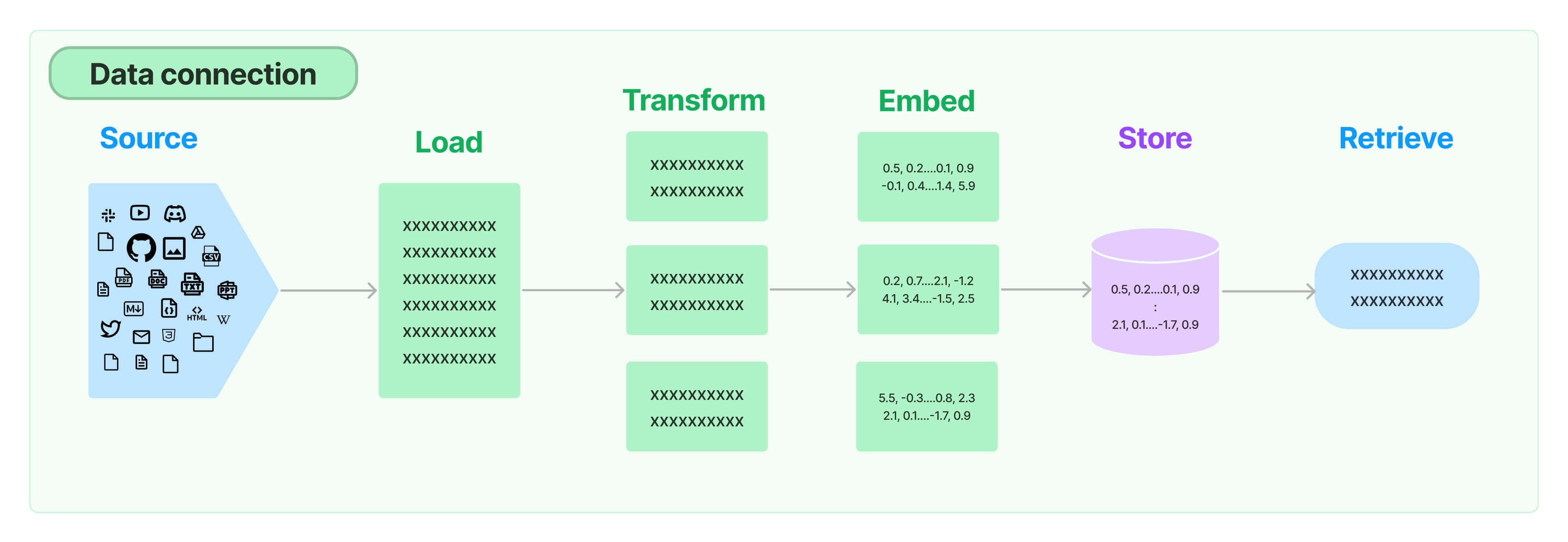
数据流:Loders->Transformers->Embeddings Model->Vector Stores->Retrievers

二、文档加载:Document Loaders

更多类型的文档加载请参考:https://python.langchain.com/docs/modules/data_connection/document_loaders/

1
2
3
4
5
6
from langchain_community.document_loaders import PyPDFLoader

loader = PyPDFLoader("MachineLearning-Lecture01.pdf")
pages = loader.load_and_split()

print(pages[0].page_content[0:500])

输出

1
2
3
4
5
6
7
MachineLearning-Lecture01  
Instructor (Andrew Ng): Okay. Good morning. Welcome to CS229, the machine
learning class. So what I wanna do today is ju st spend a little time going over the logistics
of the class, and then we'll start to talk a bit about machine learning.
By way of introduction, my name's Andrew Ng and I'll be instru ctor for this class. And so
I personally work in machine learning, and I' ve worked on it for about 15 years now, and
I actually think that machine learning i

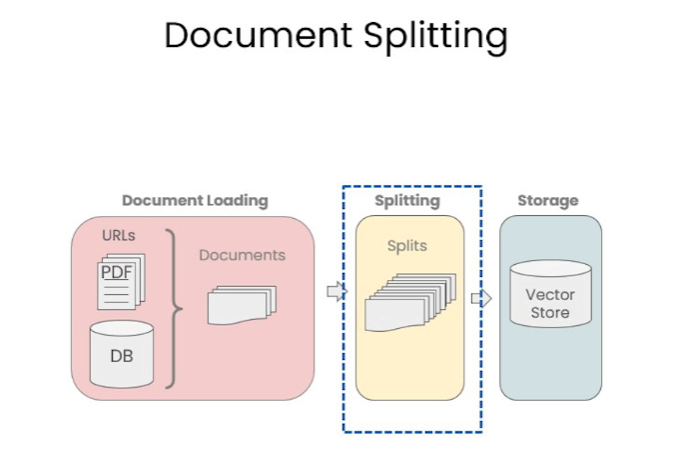
三、文档分割

文档分割原因

  1. 模型大小和内存限制:LLM模型参数量巨大,有数十亿、上百亿甚至上千亿的参数。为了在一次前向传播中处理这么多的参数,需要大量的计算能力和内存。但是,大多数硬件设备(例如 GPU 或 TPU )有内存限制。文档分割使模型能够在这些限制内工作。
  2. 计算效率:处理更长的文本序列需要更多的计算资源。通过将长文档分割成更小的块,可以更高效地进行计算。
  3. 序列长度限制:LLM模型基本都有一个固定的最大序列长度,例如2048个 token 。这意味着模型一次只能处理这么多 token 。对于超过这个长度的文档,需要进行分割才能被模型处理。
  4. 更好的泛化:通过在多个文档块上进行训练,模型可以更好地学习和泛化到各种不同的文本样式和结构。
  5. 数据增强:分割文档可以为训练数据提供更多的样本。例如,一个长文档可以被分割成多个部分,并分别作为单独的训练样本。

更多类型的文档分割请参考:https://python.langchain.com/docs/modules/data_connection/document_transformers/

Langchain中文本分割器都根据chunk_size(块大小)和chunk_overlap(块与块之间的重叠大小)进行分割。

  • chunk_size指每个块包含的字符或Token(如单词、句子等)的数量

  • chunk_overlap指两个块之间共享的字符数量,用于保持上下文的连贯性,避免分割丢失上下文信息

1
2
3
4
5
6
7
8
9
10
11
12
13
from langchain_text_splitters import RecursiveCharacterTextSplitter

text_splitter = RecursiveCharacterTextSplitter(
chunk_size=200,
chunk_overlap=100,
length_function=len,
add_start_index=True,
)

paragraphs = text_splitter.create_documents([pages[0].page_content])
for para in paragraphs[0:5]:
print(para.page_content)
print('-------')
1
2
3
4
5
6
7
8
9
10
11
12
13
14
15
16
MachineLearning-Lecture01  
Instructor (Andrew Ng): Okay. Good morning. Welcome to CS229, the machine
learning class. So what I wanna do today is ju st spend a little time going over the logistics
-------
learning class. So what I wanna do today is ju st spend a little time going over the logistics
of the class, and then we'll start to talk a bit about machine learning.
-------
of the class, and then we'll start to talk a bit about machine learning.
By way of introduction, my name's Andrew Ng and I'll be instru ctor for this class. And so
-------
By way of introduction, my name's Andrew Ng and I'll be instru ctor for this class. And so
I personally work in machine learning, and I' ve worked on it for about 15 years now, and
-------
I personally work in machine learning, and I' ve worked on it for about 15 years now, and
I actually think that machine learning is th e most exciting field of all the computer
-------

四、向量数据库和向量检索

检索是指根据用户的问题去向量数据库中搜索与问题相关的文档内容

1
2
3
4
5
6
7
8
9
10
11
12
13
14
15
16
17
18
19
20
21
22
23
24
25
26
27
28
29
30
31
32
33
34
35
36
37
38
39
40
41
42
43
44
45
46
47
48
from langchain_text_splitters import RecursiveCharacterTextSplitter
from langchain_community.vectorstores import Chroma
from langchain_community.document_loaders import PyPDFLoader
from langchain_openai import OpenAIEmbeddings
from langchain_community.embeddings.dashscope import DashScopeEmbeddings

# 加载 PDF
loaders = [
# 故意添加重复文档,使数据混乱
PyPDFLoader("MachineLearning-Lecture01.pdf"),
PyPDFLoader("MachineLearning-Lecture02.pdf"),
PyPDFLoader("MachineLearning-Lecture03.pdf")
]
docs = []
for loader in loaders:
docs.extend(loader.load())

# 分割文本

text_splitter = RecursiveCharacterTextSplitter(
chunk_size = 1500, # 每个文本块的大小。这意味着每次切分文本时,会尽量使每个块包含 1500 个字符。
chunk_overlap = 150 # 每个文本块之间的重叠部分。
)

texts = text_splitter.split_documents(docs)

# 灌库
#阿里的向量模型,没有Openai的好用
# embeddings = DashScopeEmbeddings(
# model="text-embedding-v2",
# )


embeddings = OpenAIEmbeddings() #Embedding模型

persist_directory = 'cs229_lectures/'

db = Chroma.from_documents(texts, embeddings,persist_directory=persist_directory) #向量数据导入数据库

print(db._collection.count())

# 检索 top-3 结果
retriever = db.as_retriever(search_kwargs={"k": 3}) #默认为similarity相似性搜索

docs = retriever.get_relevant_documents("is there an email i can ask for help")

print(docs[0].page_content)
1
2
3
4
5
6
7
8
9
10
11
12
13
14
15
16
17
18
19
20
627
cs229-qa@cs.stanford.edu. This goes to an acc ount that's read by all the TAs and me. So
rather than sending us email individually, if you send email to this account, it will
actually let us get back to you maximally quickly with answers to your questions.
If you're asking questions about homework probl ems, please say in the subject line which
assignment and which question the email refers to, since that will also help us to route
your question to the appropriate TA or to me appropriately and get the response back to
you quickly.
Let's see. Skipping ahead — let's see — for homework, one midterm, one open and term
project. Notice on the honor code. So one thi ng that I think will help you to succeed and
do well in this class and even help you to enjoy this cla ss more is if you form a study
group.
So start looking around where you' re sitting now or at the end of class today, mingle a
little bit and get to know your classmates. I strongly encourage you to form study groups
and sort of have a group of people to study with and have a group of your fellow students
to talk over these concepts with. You can also post on the class news group if you want to
use that to try to form a study group.
But some of the problems sets in this cla ss are reasonably difficult. People that have
taken the class before may tell you they were very difficult. And just I bet it would be
more fun for you, and you'd probably have a be tter learning experience if you form a

更多的三方检索组件链接,参考:https://python.langchain.com/docs/integrations/vectorstores

4.1 检索出现不好的情况

在加载文档时,我们故意添加重复文档,使数据混乱,结果会出现重复结果

1
2
3
4
5
6
7
8
9
10
question = "what did they say about matlab?" 

retriever = db.as_retriever(search_kwargs={"k": 5}) #默认为similarity相似性搜索

docs = retriever.get_relevant_documents(question)


print(docs[0].page_content[:100])
print("==========")
print(docs[1].page_content[:100])

输出

1
2
3
4
5
those homeworks will be done in either MATLA B or in Octave, which is sort of — I 
know some people
==========
those homeworks will be done in either MATLA B or in Octave, which is sort of — I
know some people

我们可以看到一种新的失败的情况。

下面的问题询问了关于第三讲的问题,但也包括了来自其他讲的结果。

1
2
3
4
5
question = "what did they say about regression in the third lecture?"
docs = retriever.get_relevant_documents(question)

for doc in docs:
print(doc.metadata)

输出

1
2
3
4
5
{'page': 0, 'source': 'MachineLearning-Lecture03.pdf'}
{'page': 14, 'source': 'MachineLearning-Lecture03.pdf'}
{'page': 0, 'source': 'MachineLearning-Lecture02.pdf'}
{'page': 6, 'source': 'MachineLearning-Lecture03.pdf'}
{'page': 8, 'source': 'MachineLearning-Lecture01.pdf'}

4.2 解决多样性:最大边际相关性(MMR)

最大边际相关性(Maximum marginal relevance)试图在查询的相关性和结果的多样性之间实现两全其美。

1
2
3
4
5
6
7
8
9
10
question = "what did they say about matlab?" 

retriever = db.as_retriever(search_type="mmr",search_kwargs={"k": 5}) #默认为similarity相似性搜索

docs = retriever.get_relevant_documents(question)


print(docs[0].page_content[:100])
print("==========")
print(docs[1].page_content[:100])

输出

1
2
3
4
5
those homeworks will be done in either MATLA B or in Octave, which is sort of — I 
know some people
==========
into his office and he said, "Oh, professo r, professor, thank you so much for your
machine learnin

可以看到输出已经不同了

4.3 解决特殊性

关于第三讲的问题,输出包括了来自其他讲的结果

使用元数据

为了解决这一问题,很多向量数据库都支持对metadata的操作。

metadata为每个嵌入的块(embedded chunk)提供上下文。

1
2
3
4
5
6
question = "what did they say about regression in the third lecture?"
retriever = db.as_retriever(search_kwargs={"k":3,'filter': {'source':'MachineLearning-Lecture03.pdf'}}) #默认为similarity相似性搜索

docs = retriever.get_relevant_documents(question)
for doc in docs:
print(doc.metadata)

输出

1
2
3
{'page': 0, 'source': 'MachineLearning-Lecture03.pdf'}
{'page': 14, 'source': 'MachineLearning-Lecture03.pdf'}
{'page': 4, 'source': 'MachineLearning-Lecture03.pdf'}

在元数据中使用自查询检索器

为了解决这个问题,还可以使用SelfQueryRetriever,它使用LLM来提取:

  1. 用于向量搜索的查询(query)字符串,即:问题
  2. 要一起传入的元数据过滤器

大多数向量数据库支持元数据过滤器,因此不需要任何新的数据库及索引。

AttributeInfo是我们可以指定元数据中的不同字段以及它们对应的位置。

在元数据中,我们只有两个字段,sourcepage

我们将填写每个属性的名称、描述和类型的描述。

这些信息实际上将被传递给LLM,所以需要尽可能详细地描述。

1
2
3
4
5
6
7
8
9
10
11
12
13
14
15
16
17
18
19
20
21
22
23
24
25
26
27
28
29
30
from langchain.retrievers.self_query.base import SelfQueryRetriever
from langchain.chains.query_constructor.base import AttributeInfo

metadata_field_info = [
AttributeInfo(
name="source",
description="The lecture the chunk is from, should be one of `MachineLearning-Lecture01.pdf`, `MachineLearning-Lecture02.pdf`, or `MachineLearning-Lecture03.pdf`",
type="string",
),
AttributeInfo(
name="page",
description="The page from the lecture",
type="integer",
),
]

document_content_description = "Lecture notes"
retriever = SelfQueryRetriever.from_llm(
llm,
db,
document_content_description,
metadata_field_info,
verbose=True
)

question = "what did they say about regression in the third lecture?"

docs = retriever.get_relevant_documents(question)
for d in docs:
print(d.metadata)

输出

1
2
3
4
{'page': 14, 'source': 'MachineLearning-Lecture03.pdf'}
{'page': 10, 'source': 'MachineLearning-Lecture03.pdf'}

4.4 其他技巧:压缩

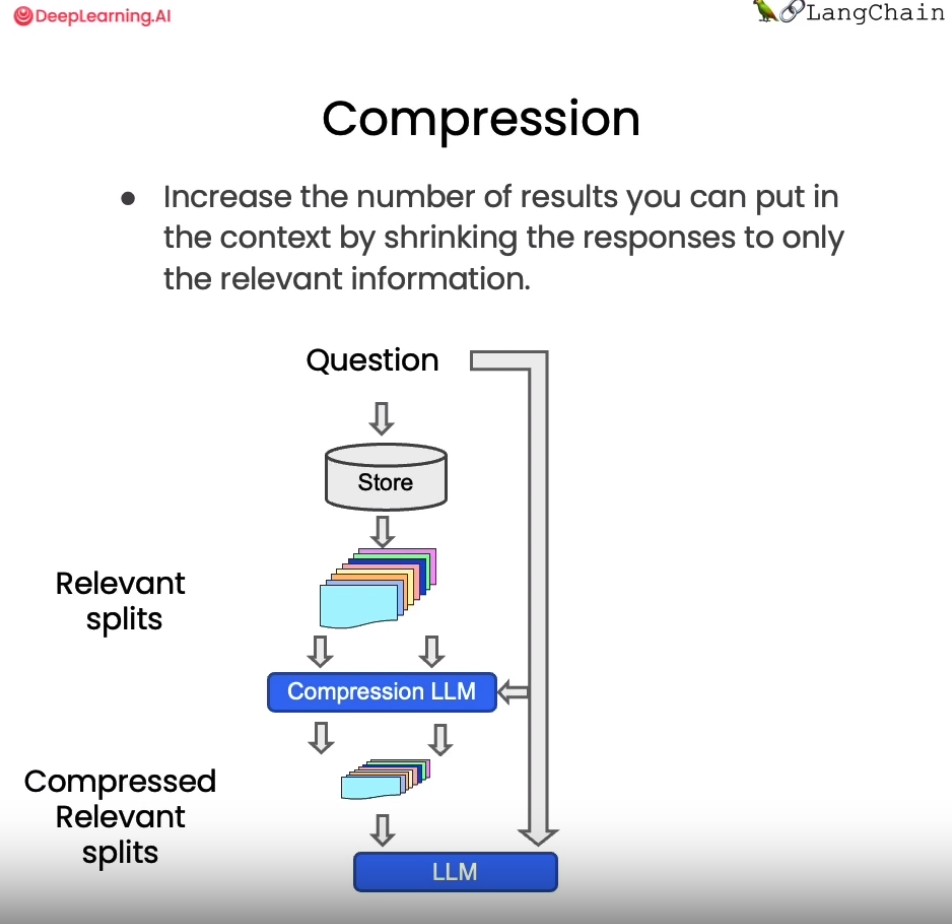
在使用向量检索获取相关文档时,直接返回整个文档片段可能带来资源浪费,因为实际相关的只是文档的一小部分。为改进这一点,LangChain提供了一种“压缩”检索机制。其工作原理是,先使用标准向量检索获得候选文档,然后基于查询语句的语义,使用语言模型压缩这些文档,只保留与问题相关的部分

从上图中我们看到,当向量数据库返回了所有与问题相关的所有文档块的全部内容后,会有一个Compression LLM来负责对这些返回的文档块的内容进行压缩,所谓压缩是指仅从文档块中提取出和用户问题相关的内容,并舍弃掉那些不相关的内容。

1
2
3
4
5
6
7
8
9
10
11
12
13
14
15
16
17
from langchain.retrievers import ContextualCompressionRetriever
from langchain.retrievers.document_compressors import LLMChainExtractor

def pretty_print_docs(docs):
print(f"\n{'-' * 100}\n".join([f"Document {i+1}:\n\n" + d.page_content for i, d in enumerate(docs)]))

llm = ChatOpenAI(temperature=0)
compressor = LLMChainExtractor.from_llm(llm) # 压缩器

compression_retriever = ContextualCompressionRetriever(
base_compressor=compressor,
base_retriever=db.as_retriever()
)

question = "what did they say about matlab?"
compressed_docs = compression_retriever.get_relevant_documents(question)
pretty_print_docs(compressed_docs)
1
2
3
4
5
6
7
8
9
10
11
12
13
14
15
16
Document 1:

MATLAB is I guess part of the programming language that makes it very easy to write codes using matrices, to write code for numerical routines, to move data around, to plot data. And it's sort of an extremely easy to learn tool to use for implementing a lot of learning algorithms.
----------------------------------------------------------------------------------------------------
Document 2:

MATLAB is I guess part of the programming language that makes it very easy to write codes using matrices, to write code for numerical routines, to move data around, to plot data. And it's sort of an extremely easy to learn tool to use for implementing a lot of learning algorithms.
----------------------------------------------------------------------------------------------------
Document 3:

MATLAB is I guess part of the programming language that makes it very easy to write codes using matrices, to write code for numerical routines, to move data around, to plot data. And it's sort of an extremely easy to learn tool to use for implementing a lot of learning algorithms.
----------------------------------------------------------------------------------------------------
Document 4:

MATLAB is I guess part of the programming language that makes it very easy to write codes using matrices, to write code for numerical routines, to move data around, to plot data. And it's sort of an extremely easy to learn tool to use for implementing a lot of learning algorithms.
there's also a software package called Octave that you can download for free off the Internet. And it has somewhat fewer features than MATLAB, but it's free, and for the purposes of this class, it will work for just about everything.

现在当我们提出问题后,查看结果文档,我们可以看到两件事。

  1. 它们比正常文档短很多
  2. 仍然有一些重复的东西,这是因为在底层我们使用的是语义搜索算法。

从上述例子中,我们可以发现这种压缩可以有效提升输出质量,同时节省通过长文档带来的计算资源浪费,降低成本。上下文相关的压缩检索技术,使得到的支持文档更严格匹配问题需求,是提升问答系统效率的重要手段。读者可以在实际应用中考虑这一技术。

4.5 以上技术融合

为了做到这一点,我们在从向量数据库创建检索器时,可以将搜索类型设置为MMR。

然后我们可以重新运行这个过程,看到我们返回的是一个过滤过的结果集,其中不包含任何重复的信息。

1
2
3
4
5
6
7
8
compression_retriever = ContextualCompressionRetriever(
base_compressor=compressor,
base_retriever=db.as_retriever(search_type = "mmr")
)

question = "what did they say about matlab?"
compressed_docs = compression_retriever.get_relevant_documents(question)
pretty_print_docs(compressed_docs)
1
2
3
4
5
6
7
8
9
10
11
Document 1:

MATLAB is I guess part of the programming language that makes it very easy to write codes using matrices, to write code for numerical routines, to move data around, to plot data. And it's sort of an extremely easy to learn tool to use for implementing a lot of learning algorithms.
----------------------------------------------------------------------------------------------------
Document 2:

"Oh, it was the MATLAB."
----------------------------------------------------------------------------------------------------
Document 3:

All the homeworks can be done in MATLAB or Octave.

五、Indexing

索引 API 允许将来自任何来源的文档加载并保持与向量存储的同步。具体来说,它帮助:

  • 避免将重复内容写入向量存储
  • 避免重写未更改的内容
  • 避免重新计算未更改内容的嵌入

即使文档经过了多次转换步骤(例如,通过文本分块),索引 API 也能正常工作。

5.1 工作原理

LangChain 索引使用一个记录管理器(RecordManager),它跟踪文档写入向量存储的情况。

在索引内容时,为每个文档计算哈希值,并将以下信息存储在记录管理器中:

  • 文档哈希(页面内容和元数据的哈希)
  • 写入时间
  • 源 ID —— 每个文档的元数据中应包含信息,以便我们确定此文档的最终来源

5.2 删除模式

在将文档索引到向量存储时,可能需要删除向量存储中的一些现有文档。在某些情况下,您可能希望删除与正在索引的新文档来源相同的任何现有文档。在其他情况下,您可能希望一次性删除所有现有文档。索引 API 删除模式允许您选择您想要的行为:

  • 无(None):不执行任何自动清理,允许用户手动清理旧内容。
  • 增量(Incremental):如果源文档或派生文档的内容已更改,增量或完全模式将清理(删除)内容的先前版本。
  • 完全(Full):如果源文档已被删除(意味着它未包含在当前正在索引的文档中),完全清理模式将正确地将其从向量存储中删除,但增量模式则不会。

当内容发生变化(例如,源 PDF 文件已修订)时,在索引期间将有一段时间,新旧版本都可能返回给用户。这发生在新内容写入之后,但在旧版本被删除之前。

  • 增量索引通过在写入时持续进行清理,最小化这段时间。
  • 完全模式在所有批次写入完成后进行清理。
  • 不要与独立于索引 API 预填充内容的存储一起使用,因为记录管理器不会知道之前已插入了记录。
  • 仅与支持以下功能的 LangChain 向量存储一起工作:按 ID 添加文档(带 IDs 参数的 add_documents 方法)和按 ID 删除(带 IDs 参数的 delete 方法)。

5.3 示例

1
2
3
4
5
6
7
8
9
10
11
12
13
14
15
16
17
18
19
20
21
22
23
24
25
26
27
28
29
30
31
from langchain.indexes import SQLRecordManager, index
from langchain_core.documents import Document
from langchain_elasticsearch import ElasticsearchStore
from langchain_openai import OpenAIEmbeddings

# 初始化向量存储并设置Embedding
collection_name = "test_index"

embedding = OpenAIEmbeddings()

vectorstore = ElasticsearchStore(
es_url="http://localhost:9200", index_name="test_index", embedding=embedding
)

# 使用适当的命名空间初始化记录管理器
namespace = f"elasticsearch/{collection_name}"
record_manager = SQLRecordManager(
namespace, db_url="sqlite:///record_manager_cache.sql"
)

# 在使用记录管理器之前创建一个模式
record_manager.create_schema()

# 索引一些测试文档
doc1 = Document(page_content="kitty", metadata={"source": "kitty.txt"})
doc2 = Document(page_content="doggy", metadata={"source": "doggy.txt"})

# 索引到一个空的向量存储:
def _clear():
"""Hacky helper method to clear content. See the `full` mode section to to understand why it works."""
index([], record_manager, vectorstore, cleanup="full", source_id_key="source")
5.3.1 None 删除模式

该模式不会自动清理旧版本的内容; 但是,它仍然负责内容重复删除。

1
2
3
4
5
6
7
8
9
10
_clear()

index(
[doc1, doc1, doc1, doc1, doc1],
record_manager,
vectorstore,
cleanup=None,
source_id_key="source",
)

输出

1
{'num_added': 1, 'num_updated': 0, 'num_skipped': 0, 'num_deleted': 0}
1
2
3
_clear()

index([doc1, doc2], record_manager, vectorstore, cleanup=None, source_id_key="source")

输出

1
{'num_added': 2, 'num_updated': 0, 'num_skipped': 0, 'num_deleted': 0}

第二次将跳过所有内容:

1
index([doc1, doc2], record_manager, vectorstore, cleanup=None, source_id_key="source")

输出

1
{'num_added': 0, 'num_updated': 0, 'num_skipped': 2, 'num_deleted': 0}

5.3.2 incremental 删除模式

1
2
3
4
5
6
7
8
9
10
_clear()

index(
[doc1, doc2],
record_manager,
vectorstore,
cleanup="incremental",
source_id_key="source",
)

输出

1
{'num_added': 2, 'num_updated': 0, 'num_skipped': 0, 'num_deleted': 0}

再次索引应该会两个文档都被跳过 —— 同时跳过Embeding操作

1
2
3
4
5
6
7
index(
[doc1, doc2],
record_manager,
vectorstore,
cleanup="incremental",
source_id_key="source",
)

输出

1
{'num_added': 0, 'num_updated': 0, 'num_skipped': 2, 'num_deleted': 0}

如果没有提供文档进行增量索引模式,将不会有任何变化。

1
index([], record_manager, vectorstore, cleanup="incremental", source_id_key="source")

输出

1
{'num_added': 0, 'num_updated': 0, 'num_skipped': 0, 'num_deleted': 0}

如果更改了一个文档,新版本将被写入,并且所有旧版本共享同一源的文档将被删除。

1
2
3
4
5
6
7
8
9
changed_doc_2 = Document(page_content="puppy", metadata={"source": "doggy.txt"})

index(
[changed_doc_2],
record_manager,
vectorstore,
cleanup="incremental",
source_id_key="source",
)

输出

1
{'num_added': 1, 'num_updated': 0, 'num_skipped': 0, 'num_deleted': 1}

5.3.3 full删除模式

在完全模式下,用户应该将应该被索引的全部内容传递给索引函数。任何没有传递给索引函数且存在于向量存储中的文档都将被删除。此行为对于处理源文档的删除很有用。

1
2
3
4
5
_clear()

all_docs = [doc1, doc2]

index(all_docs, record_manager, vectorstore, cleanup="full", source_id_key="source")
输出

1
{'num_added': 2, 'num_updated': 0, 'num_skipped': 0, 'num_deleted': 0}

假设有人删除了第一个文档:

1
2
3
del all_docs[0]

all_docs

输出

1
[Document(page_content='doggy', metadata={'source': 'doggy.txt'})]

使用full模式将会清除已删除的内容。

1
index(all_docs, record_manager, vectorstore, cleanup="full", source_id_key="source")
输出

1
{'num_added': 0, 'num_updated': 0, 'num_skipped': 1, 'num_deleted': 1}

5.4 Source

元数据属性包含一个名为 source 的字段。这个 source 应该指向与给定文档相关联的最终来源。例如,如果这些文档代表某个父文档的一些块,那么两个文档的 source 应该相同,并引用父文档。一般来说,应该始终指定 source。只有在不打算使用增量模式,并且由于某些原因无法正确指定 source 字段时,才使用 None。

1
2
3
4
5
6
7
8
9
10
11
from langchain_text_splitters import CharacterTextSplitter

doc1 = Document(
page_content="kitty kitty kitty kitty kitty", metadata={"source": "kitty.txt"}
)
doc2 = Document(page_content="doggy doggy the doggy", metadata={"source": "doggy.txt"})

new_docs = CharacterTextSplitter(
separator="t", keep_separator=True, chunk_size=12, chunk_overlap=2
).split_documents([doc1, doc2])
new_docs

输出

1
2
3
4
5
[Document(page_content='kitty kit', metadata={'source': 'kitty.txt'}),
Document(page_content='tty kitty ki', metadata={'source': 'kitty.txt'}),
Document(page_content='tty kitty', metadata={'source': 'kitty.txt'}),
Document(page_content='doggy doggy', metadata={'source': 'doggy.txt'}),
Document(page_content='the doggy', metadata={'source': 'doggy.txt'})]
1
2
3
4
5
6
7
8
9
_clear()

index(
new_docs,
record_manager,
vectorstore,
cleanup="incremental",
source_id_key="source",
)

输出

1
{'num_added': 5, 'num_updated': 0, 'num_skipped': 0, 'num_deleted': 0}

这应该删除与doggy.txt源关联的文档的旧版本,并将其替换为新版本。

1
2
3
4
5
6
7
8
9
10
11
12
changed_doggy_docs = [
Document(page_content="woof woof", metadata={"source": "doggy.txt"}),
Document(page_content="woof woof woof", metadata={"source": "doggy.txt"}),
]

index(
changed_doggy_docs,
record_manager,
vectorstore,
cleanup="incremental",
source_id_key="source",
)

输出

1
{'num_added': 2, 'num_updated': 0, 'num_skipped': 0, 'num_deleted': 2}
1
vectorstore.similarity_search("dog", k=30)

输出

1
2
3
4
5
[Document(page_content='woof woof', metadata={'source': 'doggy.txt'}),
Document(page_content='woof woof woof', metadata={'source': 'doggy.txt'}),
Document(page_content='tty kitty', metadata={'source': 'kitty.txt'}),
Document(page_content='tty kitty ki', metadata={'source': 'kitty.txt'}),
Document(page_content='kitty kit', metadata={'source': 'kitty.txt'})]

5.5 和loaders一起用

索引可以接受文档的可迭代或任何加载器。

1
2
3
4
5
6
7
8
9
10
11
12
13
14
15
16
17
18
19
20
21
22
from langchain_community.document_loaders.base import BaseLoader


class MyCustomLoader(BaseLoader):
def lazy_load(self):
text_splitter = CharacterTextSplitter(
separator="t", keep_separator=True, chunk_size=12, chunk_overlap=2
)
docs = [
Document(page_content="woof woof", metadata={"source": "doggy.txt"}),
Document(page_content="woof woof woof", metadata={"source": "doggy.txt"}),
]
yield from text_splitter.split_documents(docs)

def load(self):
return list(self.lazy_load())

_clear()

loader = MyCustomLoader()

loader.load()

输出

1
2
[Document(page_content='woof woof', metadata={'source': 'doggy.txt'}),
Document(page_content='woof woof woof', metadata={'source': 'doggy.txt'})]
1
index(loader, record_manager, vectorstore, cleanup="full", source_id_key="source")
输出

1
{'num_added': 2, 'num_updated': 0, 'num_skipped': 0, 'num_deleted': 0}
1
vectorstore.similarity_search("dog", k=30)

输出

1
2
[Document(page_content='woof woof', metadata={'source': 'doggy.txt'}),
Document(page_content='woof woof woof', metadata={'source': 'doggy.txt'})]

参考


LangChain(三)——Data Connection
https://mztchaoqun.com.cn/posts/D27_LangChain_Retrieval/
作者
mztchaoqun
发布于
2024年7月6日
许可协议