Querying是LLM应用中最重要的部分。
一、Query Engine
查询引擎是一个通用的接口,允许对数据提出问题。查询引擎接收自然语言查询,并返回一个丰富的响应。它通常是通过检索器建立在一个或多个索引之上。可以组合多个查询引擎以实现更高级的功能。
1.1 使用示例
从索引构建查询引擎:
1
2
query_engine = index.as_query_engine()"Who is Paul Graham?" )
1.1.1 配置Query Engine
High-Level API
可以直接用一行代码构建并配置一个查询引擎:
1
2
3
4
query_engine = index.as_query_engine("tree_summarize" ,True ,
虽然High-Level API
优化了易用性,但它并没有暴露全部的可配置性范围。更多response_mode
Low-Level Composition API
如果你需要更精细的控制,可以使用Low-Level Composition API。
具体来说,需要显式构造一个 QueryEngine对象,而不是调用
index.as_query_engine(...)。
1
2
3
4
5
6
7
8
9
10
11
12
13
14
15
16
17
18
19
20
21
22
23
24
25
26
27
from llama_index.core import VectorStoreIndex, get_response_synthesizerfrom llama_index.core.retrievers import VectorIndexRetrieverfrom llama_index.core.query_engine import RetrieverQueryEngine2 ,"tree_summarize" ,"What did the author do growing up?" )print (response)
Streaming
要启用流式传输,只需要传入一个 streaming=True
1
2
3
4
5
6
7
query_engine = index.as_query_engine(True ,"What did the author do growing up?" ,
详细可查看Streaming 和具体例子
1.1.2 定义自定义Query Engine
也可以定义一个自定义查询引擎。只需继承 CustomQueryEngine
类,定义想要的任何属性(类似于定义一个
Pydantic类),并实现一个返回 Response
对象或字符串的 custom_query 函数。
1
2
3
4
5
6
7
8
9
10
11
12
13
14
15
16
from llama_index.core.query_engine import CustomQueryEnginefrom llama_index.core.retrievers import BaseRetrieverfrom llama_index.core import get_response_synthesizerfrom llama_index.core.response_synthesizers import BaseSynthesizerclass RAGQueryEngine (CustomQueryEngine ):"""RAG Query Engine.""" def custom_query (self, query_str: str ):self .retriever.retrieve(query_str)self .response_synthesizer.synthesize(query_str, nodes)return response_obj
可以查看详细例子
1.2 Response Modes
目前,支持以下选项:
refine:通过顺序遍历每个检索到的文本块来创建和完善 答案。这会为每个节点/检索到的块进行单独的LLM调用。
Details :使用text_qa_template
prompt在查询中使用第一块。然后,使用答案和下一块(以及原始问题)在另一个查询中使用refine_template
prompt。如此继续,直到解析完所有块。
如果一个块太大而无法适应窗口(考虑到prompt大小),则使用TokenTextSplitter进行分割(允许块之间有一些文本重叠),并且(新的)额外块被视为原始块集合的块(因此也使用refine_template进行查询)。适用于更详细的答案。
compact(默认):类似于refine,但是事先将块进行compact (串联)处理,从而减少LLM调用。
Details :填充尽可能多的可以适合上下文窗口的文本(从检索到的块连接/打包)(考虑text_qa_template和refine_template之间的最大prompt大小)。
如果文本太长而无法容纳在一个提示中,则会根据需要将其拆分为多个部分(使用
TokenTextSplitter,从而允许文本块之间存在一些重叠)。每个文本部分都被视为一个“块”,并被发送到refine合成器。简而言之,它就像refine一样,但
LLM 调用较少。
tree_summarize:根据需要多次使用summary_template
prompt查询LLM,以便查询所有串联的块,从而产生尽可能多的答案,这些答案本身在tree_summarize
LLM调用中递归地用作块,依此类推,直到只剩下一个块
,因此只有一个最终答案。
Details :使用summary_template
prompt尽可能多地连接块以适合上下文窗口,并在需要时分割它们(再次使用TokenTextSplitter和一些文本重叠)。
然后,根据summary_template查询每个生成的块/分割(没有细化查询!)并获得尽可能多的答案。如果只有一个答案(因为只有一大块),那么它就是最终答案。如果有多个答案,则这些本身被视为块并递归发送到
tree_summarize
进程(连接/拆分以适合/查询)。适用于总结目的。
simple_summarize:截断所有文本块以适合单个 LLM
prompt。 适合快速总结,但可能会因截断而丢失细节。
no_text:仅运行检索器来获取本应发送到 LLM
的节点,而不实际发送它们。
然后可以通过检查response.source_nodes来检查。
accumulate:给定一组文本块和查询,将查询应用于每个文本块,同时将响应累积到数组中。
返回所有响应的串联字符串。
适合当需要对每个文本块单独运行相同的查询时。
compact_accumulate:与accumulate
相同,但会像compact 一样“压缩”每个LLM
prompt,并对每个文本块运行相同的查询。
更多请查看Response
Synthesizer
1.3 Streaming
LlamaIndex
支持在生成响应的同时进行流式传输。这样,可以在完整响应生成完毕之前就开始打印或处理响应的开始部分。这可以显著减少查询的感知延迟。
1.3.1 设置
要启用流式处理,需要使用支持流式处理的 LLM。目前,流式处理由
OpenAI、HuggingFaceLLM 和大多数 LangChain
LLMs(通过 LangChainLLM)支持。如果选择的 LLM
不支持流式处理,将会引发NotImplementedError。要使用high-level
API 配置查询引擎以使用流式处理,构建查询引擎时设置
streaming=True。
1 query_engine = index.as_query_engine(streaming=True , similarity_top_k=1 )
如果使用Low-Level API 组合查询引擎,在构建
Response Synthesizer 时传递
streaming=True:
1
2
3
4
from llama_index.core import get_response_synthesizerTrue , ...)
1.3.2 流式响应
在正确配置了 LLM 和查询引擎之后,调用 query 返回一个
StreamingResponse 对象。
1
2
3
streaming_response = query_engine.query("What did the author do growing up?" ,
响应在 LLM 调用开始时立即返回,无需等待完全完成。在查询引擎进行多个
LLM 调用的情况下,只有最后一个 LLM 调用会被流式传输,响应在最后一个 LLM
调用开始时返回。
可以从流式响应中获取一个Generator,并在
Token 到达时迭代它们:
1
2
3
for text in streaming_response.response_gen:pass
如果只想在它们到达时打印文本:
1 streaming_response.print_response_stream()
完整例子
Module
Guides
Supporting
Modules
二、Chat Engine
聊天引擎是一个high-level接口,用于与数据进行对话(多轮问答而非单一的问答)。想象一下ChatGPT与知识库相结合。从概念上讲,它是一个有状态的查询引擎 的类比。通过跟踪对话历史,它能够考虑过去的上下文来回答问题。如果想要在数据上提出独立问题(即不保留对话历史记录),请改用查询引擎。
2.1 使用示例
从索引构建Chat Engine:
1
2
3
4
5
6
7
8
chat_engine = index.as_chat_engine()"Tell me a joke." )
2.1.1 配置聊天引擎
配置聊天引擎与配置查询引擎非常相似。
High-Level API
可以在一行代码中直接构建并配置聊天引擎:
1 chat_engine = index.as_chat_engine(chat_mode="condense_question" , verbose=True )
可用的聊天模式
best - 将查询引擎变成一个工具,与 ReAct
数据代理或 OpenAI 数据代理一起使用,具体取决于 LLM
支持的内容。 OpenAI 数据代理需要 gpt-3.5-turbo
或 gpt-4,因为它们支持 Function Calling。condense_question -
查看聊天记录并重写用户消息作为索引的查询。
从查询引擎读取响应后返回响应。context - 使用每个用户消息从索引中检索节点。
检索到的文本被插入到system prompt中,以便聊天引擎可以自然响应或使用来自查询引擎的上下文。condense_plus_context - condense_question
和 context 的组合。
查看聊天记录,将用户消息重写为索引的检索查询。
检索到的文本被插入到system prompt中,以便聊天引擎可以自然响应或使用来自查询引擎的上下文。simple - 直接与 LLM
进行简单的聊天,不涉及查询引擎。react - 与best相同,但强制使用
ReAct 数据代理。openai - 与 best 相同,但强制使用
OpenAI 数据代理。
Low-Level Composition API
如果您需要更细粒度的控制,可以使用低级组合 API。具体来说,明确构建
ChatEngine 对象,而不是调用
index.as_chat_engine(...)。
这个示例配置了以下内容: - 配置
condense question prompt, - 用一些现有历史初始化对话, -
打印详细的调试消息。
1
2
3
4
5
6
7
8
9
10
11
12
13
14
15
16
17
18
19
20
21
22
23
24
25
26
27
28
29
30
31
32
33
34
35
36
from llama_index.core import PromptTemplatefrom llama_index.core.llms import ChatMessage, MessageRolefrom llama_index.core.chat_engine import CondenseQuestionChatEngine"""\ Given a conversation (between Human and Assistant) and a follow up message from Human, \ rewrite the message to be a standalone question that captures all relevant context \ from the conversation. <Chat History> {chat_history} <Follow Up Message> {question} <Standalone question> """ "Hello assistant, we are having a insightful discussion about Paul Graham today." ,"Okay, sounds good." ),True ,
Streaming
要启用流式传输,只需调用 stream_chat 而不是
chat。这与查询引擎(传递一个 streaming=True
标志)有些不同。
1
2
3
4
chat_engine = index.as_chat_engine()"Tell me a joke." )for token in streaming_response.response_gen:print (token, end="" )
完整例子
2.2 Module Guides
LlamaINdex提供了一些简单的实现方式来开始,更复杂的模式即将推出!更具体地说,SimpleChatEngine
不使用知识库,而其他所有引擎都使用基于知识库的查询引擎。
三、Retriever
检索器负责根据用户查询(或聊天消息)获取最相关的上下文。它可以建立在索引之上,也可以独立定义。它被用作查询引擎(和聊天引擎)中检索相关上下文的关键构建块。
3.1 使用示例
从索引获取检索器:
1
2
retriever = index.as_retriever()"Who is Paul Graham?" )
3.1.1 High-Level API
Selecting a Retriever
可以通过 retriever_mode
选择特定于索引的检索器类。例如,使用 SummaryIndex
1
2
3
retriever = summary_index.as_retriever("llm" ,
这会在摘要索引之上创建一个 SummaryIndexLLMRetriever 。
查看检索器模式 以获取完整列表的(特定于索引的)检索器模式以及它们映射到的检索器类。
Configuring a Retriever
同样,可以传递 kwargs
来配置所选的检索器。例如,如果选择llm检索器模式:
1
2
3
4
retriever = summary_index.as_retriever("llm" ,5 ,
3.1.2 Low-Level Composition API
如果你需要更细粒度的控制,可以使用低级组合
API。为了实现与上述相同的结果,可以直接导入并构造所需的检索器类:
1
2
3
4
5
6
from llama_index.core.retrievers import SummaryIndexLLMRetriever5 ,
Retriever Modules:https://docs.llamaindex.ai/en/stable/module_guides/querying/retriever/retrievers/
3.2 Retriever Modes
这里展示了从 retriever_mode
配置到选定的检索器类的映射。
3.2.1 向量索引
指定 retriever_mode
没有效果(被静默忽略)。vector_index.as_retriever(...)
总是返回一个 VectorIndexRetriever。
3.2.2 摘要索引
default:SummaryIndexRetriever
embedding:SummaryIndexEmbeddingRetriever
llm:SummaryIndexLLMRetriever
3.2.3 树索引
select_leaf:TreeSelectLeafRetriever
select_leaf_embedding:TreeSelectLeafEmbeddingRetriever
all_leaf:TreeAllLeafRetriever
root:TreeRootRetriever
3.2.4 关键词表索引
default:KeywordTableGPTRetriever
simple:KeywordTableSimpleRetriever
rake:KeywordTableRAKERetriever
3.2.5 知识图谱索引
keyword:KGTableRetriever
embedding:KGTableRetriever
hybrid:KGTableRetriever
3.2.6 文档摘要索引
llm:DocumentSummaryIndexLLMRetriever
embedding:DocumentSummaryIndexEmbeddingRetrievers
四、Node Postprocessor
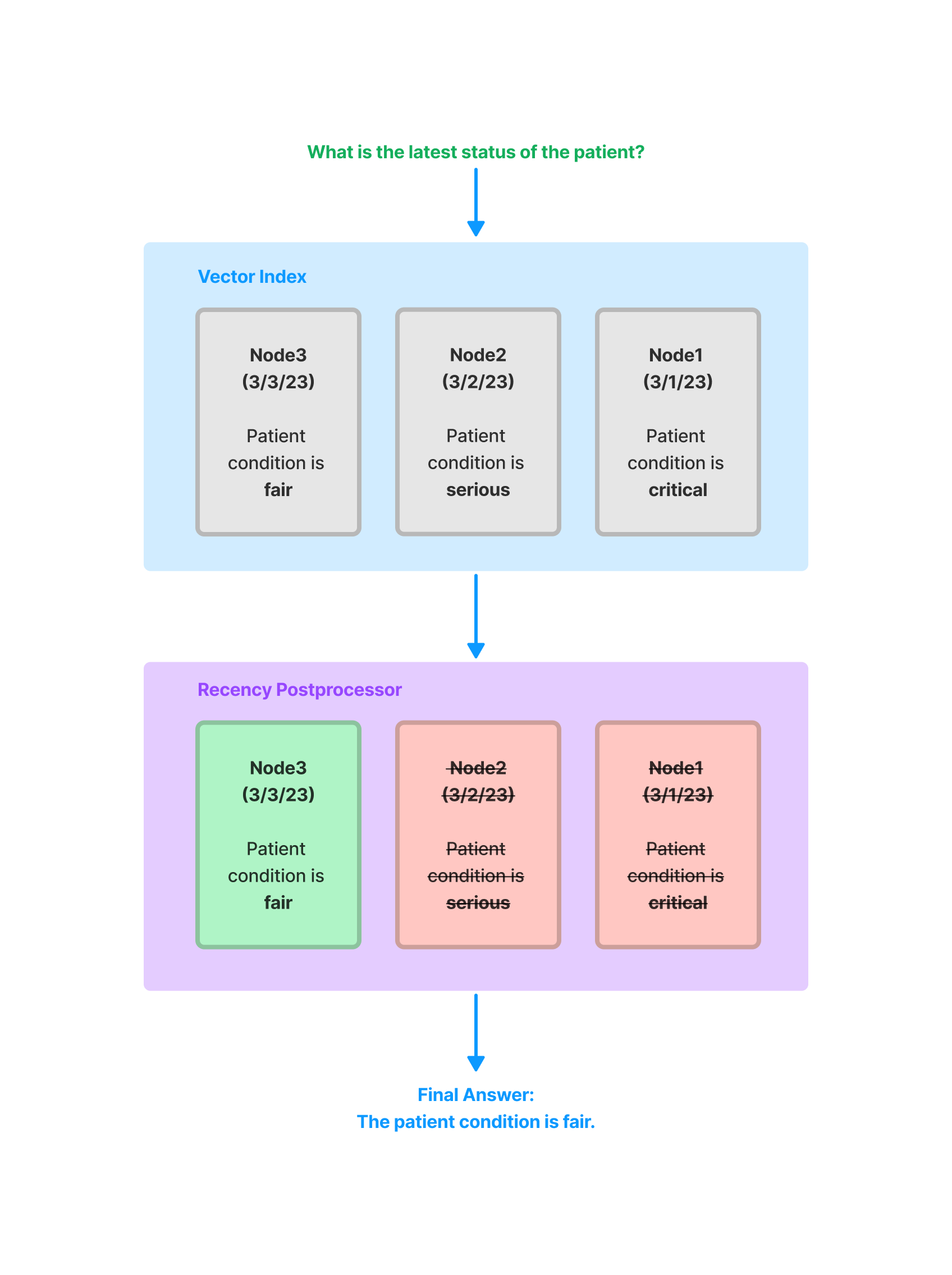
Node
Postprocessor是一组模块,它们接收一组节点,应用某种转换或过滤,然后返回这些节点。在
LlamaIndex 中,Node
Postprocessor通常在查询引擎中应用,在节点检索步骤之后和响应合成步骤之前。LlamaIndex
提供了几个立即可用的Node Postprocessor,并提供了一个简单的 API
用于添加自定义Postprocessor。
4.1 使用示例
4.1.1 和Query Engine一起用
1
2
3
4
5
6
7
8
9
10
11
12
13
14
15
16
17
from llama_index.core import VectorStoreIndex, SimpleDirectoryReaderfrom llama_index.core.postprocessor import TimeWeightedPostprocessor"./data" ).load_data()0.5 , time_access_refresh=False , top_k=1 "query string" )
4.1.2 和Retrieved Nodes一起用
作为独立对象用于过滤检索到的节点:
1
2
3
4
5
6
7
from llama_index.core.postprocessor import SimilarityPostprocessor"test query str" )0.75 )
4.1.3 和自己的Nodes一起用
PostProcessor接受 NodeWithScore
对象作为输入,这只是一个带有节点和得分值的包装类。
1
2
3
4
5
6
7
8
9
10
11
12
13
14
15
16
17
from llama_index.core.postprocessor import SimilarityPostprocessorfrom llama_index.postprocessor.cohere_rerank import CohereRerankfrom llama_index.core.data_structs import Nodefrom llama_index.core.schema import NodeWithScore"text1" ), score=0.7 ),"text2" ), score=0.8 ),0.75 )"<COHERE_API_KEY>" , top_n=2 )"<user_query>" )
postprocess_nodes 可以接收一个 query_str 或
query_bundle
(QueryBundle),但不能同时接收两者。
4.1.4 自定义Node PostProcessor
基础类是 BaseNodePostprocessor,API 接口非常简单:
1
2
3
4
5
6
7
8
class BaseNodePostprocessor :"""Node postprocessor.""" @abstractmethod def _postprocess_nodes ( self, nodes: List [NodeWithScore], query_bundle: Optional [QueryBundle] ) -> List [NodeWithScore]:"""Postprocess nodes."""
只需几行代码即可实现虚拟Node PostProcessor:
1
2
3
4
5
6
7
8
9
10
11
12
13
14
from llama_index.core import QueryBundlefrom llama_index.core.postprocessor.types import BaseNodePostprocessorfrom llama_index.core.schema import NodeWithScoreclass DummyNodePostprocessor (BaseNodePostprocessor ):def _postprocess_nodes ( self, nodes: List [NodeWithScore], query_bundle: Optional [QueryBundle] ) -> List [NodeWithScore]:for n in nodes:1 return nodes
4.2 Node Postprocessor Modules
4.2.1 SimilarityPostprocessor
用于移除相似度得分低于阈值的节点。
1
2
3
4
5
from llama_index.core.postprocessor import SimilarityPostprocessor0.7 )
4.2.2 KeywordNodePostprocessor
用于确保某些关键词要么被排除要么被包含。
1
2
3
4
5
6
7
from llama_index.core.postprocessor import KeywordNodePostprocessor"word1" , "word2" ], exclude_keywords=["word3" , "word4" ]
4.2.3
MetadataReplacementPostProcessor
用于将节点内容替换为节点元数据中的字段。如果元数据中没有该字段,则节点文本保持不变。通常与
SentenceWindowNodeParser 结合使用时最有用。
1
2
3
4
5
6
7
from llama_index.core.postprocessor import MetadataReplacementPostProcessor"window" ,
4.2.4 LongContextReorder
模型很难获取扩展上下文中心的重要细节。 一项研究发现 ,当关键数据位于输入上下文的开头或结尾时,通常会出现最佳性能。
此外,随着输入上下文的延长,即使在为长上下文设计的模型中,性能也会显着下降。该模块将对检索到的节点重新排序,这在需要大的
top-k 的情况下非常有用。
1
2
3
4
5
from llama_index.core.postprocessor import LongContextReorder
4.2.5
SentenceEmbeddingOptimizer
该postprocessor通过移除与查询不相关的句段(这是通过Embedding来完成的)来优化
Token
使用。百分位截止是一个使用相关句段的顶部百分比的度量。也可以指定阈值截止,它使用原始相似度截止来选择要保留的句段。
1
2
3
4
5
6
7
8
9
from llama_index.core.postprocessor import SentenceEmbeddingOptimizer0.5 ,
完整例子
4.2.6 CohereRerank
使用Cohere ReRank功能对节点重新排序,并返回前 N
个节点。
1
2
3
4
5
6
7
from llama_index.postprocessor.cohere_rerank import CohereRerank2 , model="rerank-english-v2.0" , api_key="YOUR COHERE API KEY"
完整例子
使用entence-transformer包中的交叉编码器对节点重新排序,并返回前 N
个节点。
1
2
3
4
5
6
7
8
from llama_index.core.postprocessor import SentenceTransformerRerank"cross-encoder/ms-marco-MiniLM-L-2-v2" , top_n=3
完整例子
sentence-transformer 文档完整的模型列表(还显示了速度/准确性之间的权衡)。默认模型是
cross-encoder/ms-marco-TinyBERT-L-2-v2。
4.2.8 LLM Rerank
使用 LLM 通过要求 LLM
返回相关文档和它们相关性的得分来重新排序节点。返回前 N
个排名的节点。
1
2
3
4
5
from llama_index.core.postprocessor import LLMRerank2 , service_context=service_context)
完整例子:Gatsby ,Lyft-10k
4.2.9 JinaRerank
使用 Jina ReRank功能对节点重新排序,并返回前 N
个节点。
1
2
3
4
5
6
7
from llama_index.postprocessor.jinaai_rerank import JinaRerank2 , model="jina-reranker-v1-base-en" , api_key="YOUR JINA API KEY"
完整例子
4.2.10 FixedRecencyPostprocessor
该Postprocessor按日期返回前 K
个节点。这假设每个节点的元数据中都有一个可解析的date字段。
1
2
3
4
5
6
7
from llama_index.core.postprocessor import FixedRecencyPostprocessor1 , date_key="date"
完整例子
4.2.11
EmbeddingRecencyPostprocessor
该Postprocessor在按日期排序并移除测量Embedding相似性后过于相似的旧节点后,返回前
K 个节点。
1
2
3
4
5
from llama_index.core.postprocessor import TimeWeightedPostprocessor0.99 , top_k=1 )
完整例子
4.2.12 TimeWeightedPostprocessor
该Postprocessor通过为每个节点应用时间加权重新排序来返回前 K
个节点。每次检索节点时,都会记录检索的时间。这使得搜索偏向于尚未在查询中返回的信息。
1
2
3
4
5
from llama_index.core.postprocessor import TimeWeightedPostprocessor0.99 , top_k=1 )
完整例子
4.2.13 PIINodePostprocessor
(Beta)
PII(Personal Identifiable
Information)Postprocessor通过使用命名实体识别(NER)(可以是专用的 NER
模型,也可以是本地 LLM 模型)来移除可能是安全风险的信息。
LLM Version
1
2
3
4
5
6
7
from llama_index.core.postprocessor import PIINodePostprocessor
NER Version
这个版本使用了 Hugging Face 默认的本地模型,该模型在运行
pipeline("ner") 时加载。
1
2
3
4
5
from llama_index.core.postprocessor import NERPIINodePostprocessor
完整例子
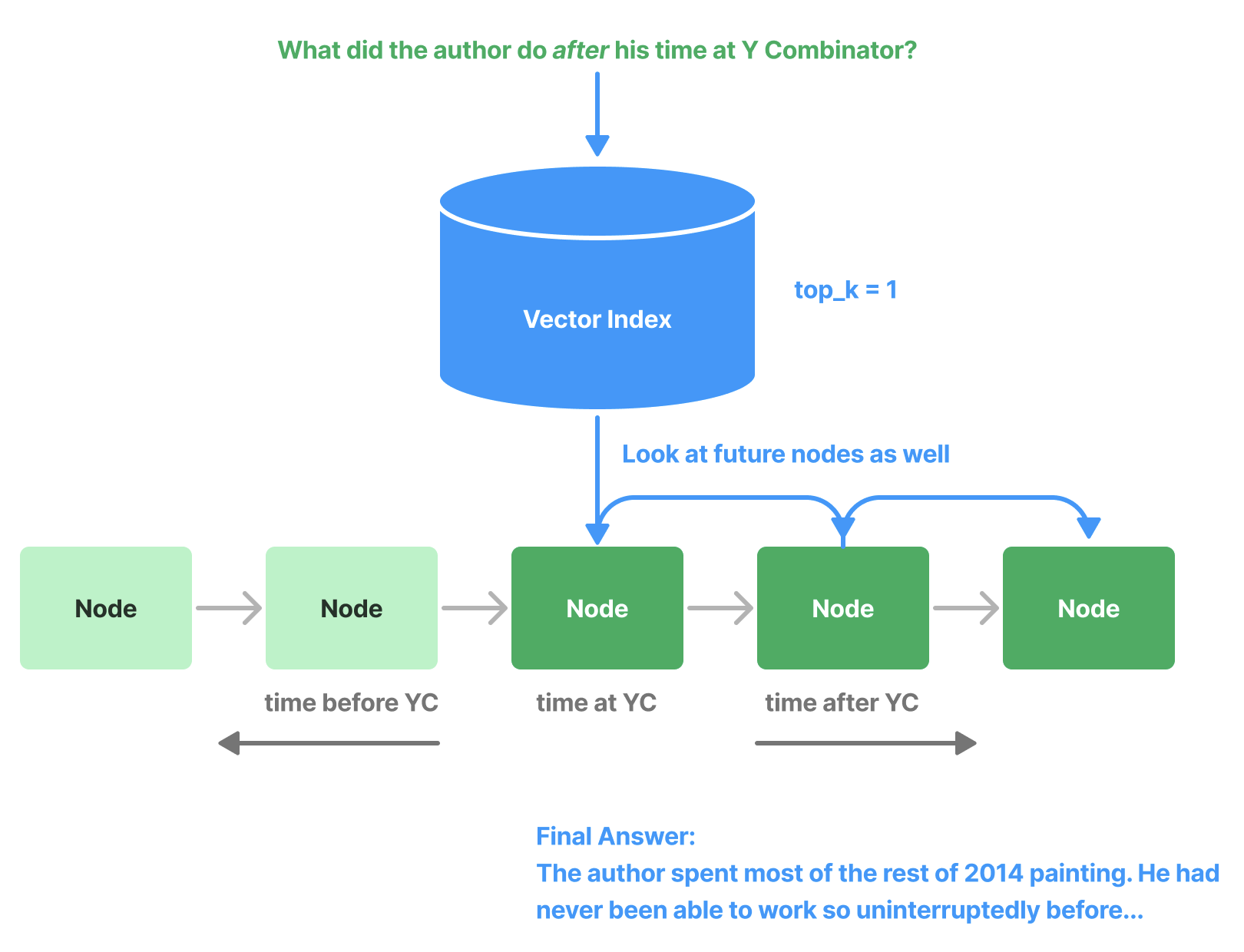
4.2.14 PrevNextNodePostprocessor
(Beta)
使用预定义的设置读取Node关系,并获取所有之前、之后或两者的节点。当知道关系指向重要数据(无论是之前的、之后的,还是两者)并且如果检索到该节点,则应将其发送到
LLM 时,这非常有用。
1
2
3
4
5
6
7
8
9
from llama_index.core.postprocessor import PrevNextNodePostprocessor1 , "next" ,
4.2.15
AutoPrevNextNodePostprocessor (Beta)
与PrevNextNodePostprocessor相同,但让 LLM
决定模式(下一个、上一个或两者)。
1
2
3
4
5
6
7
8
from llama_index.core.postprocessor import AutoPrevNextNodePostprocessor1 ,
完整例子
4.2.16 RankGPT(Beta)
使用 RankGPT 代理根据相关性对文档重新排序。返回前 N
个排名的节点。
1
2
3
4
5
from llama_index.postprocessor.rankgpt_rerank import RankGPTRerank3 , llm=OpenAI(model="gpt-3.5-turbo-16k" ))
完整例子
4.2.17 ColbertRerank
使用 Colbert V2
模型作为重排序器,根据查询词元和段落词元之间的细粒度相似性对文档重新排序。返回前
N 个排名的节点。
1
2
3
4
5
6
7
8
9
10
11
12
13
14
15
16
from llama_index.postprocessor.colbert_rerank import ColbertRerank5 ,"colbert-ir/colbertv2.0" ,"colbert-ir/colbertv2.0" ,True ,10 ,
完整例子
4.2.18 rankLLM
使用 rankLLM 的模型对文档重新排序。返回前 N 个排名的节点。
1
2
3
4
from llama_index.postprocessor import RankLLMRerank5 , model="zephyr" )
完整例子
五、Response Synthesizer
Response Synthesizer使用用户查询和给定的一组文本块从 LLM 生成响应。
Response Synthesizer的输出是一个 Response
对象。执行此操作的方法可以采取多种形式,从简单的迭代文本块到复杂的构建树。
这里的主要思想是简化使用 LLM
跨数据生成响应的过程。当在查询引擎中使用时,Response
Synthesizer在从检索器检索节点之后以及运行任何节点postprocessor之后使用。
5.1 使用示例
为查询引擎配置响应合成器,使用response_mode:
1
2
3
4
5
6
7
8
9
from llama_index.core.data_structs import Nodefrom llama_index.core.schema import NodeWithScorefrom llama_index.core import get_response_synthesizer"compact" )"query text" , nodes=[NodeWithScore(node=Node(text="text" ), score=1.0 ), ...]
在创建索引后的查询引擎中:
1
2
query_engine = index.as_query_engine(response_synthesizer=response_synthesizer)"query_text" )
5.2 Response Mode
响应合成器通常通过 response_mode kwarg
设置来指定。LlamaIndex 中已经实现了几个响应合成器:
refine:通过顺序遍历每个检索到的文本块来创建和完善 答案。这会为每个节点/检索到的块进行单独的LLM调用。
Details :使用text_qa_template
prompt在查询中使用第一块。然后,使用答案和下一块(以及原始问题)在另一个查询中使用refine_template
prompt。如此继续,直到解析完所有块。
如果一个块太大而无法适应窗口(考虑到prompt大小),则使用TokenTextSplitter进行分割(允许块之间有一些文本重叠),并且(新的)额外块被视为原始块集合的块(因此也使用refine_template进行查询)。适用于更详细的答案。
compact(默认):类似于refine,但是事先将块进行compact (串联)处理,从而减少LLM调用。
Details :填充尽可能多的可以适合上下文窗口的文本(从检索到的块连接/打包)(考虑text_qa_template和refine_template之间的最大prompt大小)。
如果文本太长而无法容纳在一个提示中,则会根据需要将其拆分为多个部分(使用
TokenTextSplitter,从而允许文本块之间存在一些重叠)。每个文本部分都被视为一个“块”,并被发送到refine合成器。简而言之,它就像refine一样,但
LLM 调用较少。
tree_summarize:根据需要多次使用summary_template
prompt查询LLM,以便查询所有串联的块,从而产生尽可能多的答案,这些答案本身在tree_summarize
LLM调用中递归地用作块,依此类推,直到只剩下一个块
,因此只有一个最终答案。
Details :使用summary_template
prompt尽可能多地连接块以适合上下文窗口,并在需要时分割它们(再次使用TokenTextSplitter和一些文本重叠)。
然后,根据summary_template查询每个生成的块/分割(没有细化查询!)并获得尽可能多的答案。如果只有一个答案(因为只有一大块),那么它就是最终答案。如果有多个答案,则这些本身被视为块并递归发送到
tree_summarize
进程(连接/拆分以适合/查询)。适用于总结目的。
simple_summarize:截断所有文本块以适合单个 LLM
prompt。 适合快速总结,但可能会因截断而丢失细节。
no_text:仅运行检索器来获取本应发送到 LLM
的节点,而不实际发送它们。
然后可以通过检查response.source_nodes来检查。
accumulate:给定一组文本块和查询,将查询应用于每个文本块,同时将响应累积到数组中。
返回所有响应的串联字符串。
适合当需要对每个文本块单独运行相同的查询时。
compact_accumulate:与accumulate
相同,但会像compact 一样“压缩”每个LLM
prompt,并对每个文本块运行相同的查询。
5.3 Custom Response
Synthesizers
每个响应合成器都继承自llama_index.response_synthesizers.base.BaseSynthesizer。基API非常简单,这使得创建自己的响应合成器变得容易。要自定义tree_summarize中每个步骤使用的模板,或者也许有一篇新的研究论文详细介绍了一种新的方法来生成对查询的响应,你可以创建自己的响应合成器并将其插入到任何查询引擎中,或者独立使用它。
下面展示了__init__()函数,以及每个响应合成器必须实现的两个抽象方法。基本要求是处理查询和文本块,并返回一个字符串(或字符串生成器)响应。
1
2
3
4
5
6
7
8
9
10
11
12
13
14
15
16
17
18
19
20
21
22
23
24
25
26
27
28
29
30
31
32
33
34
35
from llama_index.core import Settingsclass BaseSynthesizer (ABC ):"""Response builder class.""" def __init__ ( self, llm: Optional [LLM] = None , streaming: bool = False , ) -> None :"""Init params.""" self ._llm = llm or Settings.llmself ._callback_manager = Settings.callback_managerself ._streaming = streaming @abstractmethod def get_response ( self, query_str: str , text_chunks: Sequence [str ], **response_kwargs: Any , ) -> RESPONSE_TEXT_TYPE:"""Get response.""" @abstractmethod async def aget_response ( self, query_str: str , text_chunks: Sequence [str ], **response_kwargs: Any , ) -> RESPONSE_TEXT_TYPE:"""Get response."""
5.4 Using Structured Answer
Filtering
当使用refine或compact响应合成模块时,使用
structured_answer_filtering 选项是有益的。
1
2
3
from llama_index.core import get_response_synthesizerTrue )
将structured_answer_filtering设置为True时,refine模块能够过滤掉与所问问题不相关的任何输入节点。这对于涉及从外部向量存储中检索文本块的基于RAG的问答系统特别有用。
如果你使用的是支持Function Calling的OpenAI模型,这个选项特别有用。其他没有Function Calling支持的LLM提供商或模型可能在产生此功能依赖的结构化响应方面不太可靠。
5.5 使用自定义Prompt Templates
自定义响应合成器中使用的Prompt,并且还想在查询时添加额外的变量。可以在get_response的**kwargs中指定这些额外的变量。
1
2
3
4
5
6
7
8
9
10
11
12
13
14
15
16
17
18
19
20
21
22
23
24
from llama_index.core import PromptTemplatefrom llama_index.core.response_synthesizers import TreeSummarize"Context information is below.\n" "---------------------\n" "{context_str}\n" "---------------------\n" "Given the context information and not prior knowledge, " "answer the query.\n" "Please also write the answer in the tone of {tone_name}.\n" "Query: {query_str}\n" "Answer: " True , summary_template=qa_prompt)"who is Paul Graham?" , [text], tone_name="a Shakespeare play"
5.6 Response Synthesis Modules
以下是每个响应合成器的详细输入/输出信息。
5.6.1 API Example
以下展示了使用所有关键字参数的设置。 - response_mode
指定使用哪个响应合成器 - service_context 定义了用于合成的
LLM 及相关设置 - text_qa_template 和
refine_template 是在不同阶段使用的prompt -
use_async 目前仅用于 tree_summarize
响应模式,用于异步构建摘要树 - streaming
配置是否返回一个流式响应对象 - structured_answer_filtering
启用对与给定问题不相关的文本块的主动过滤
在 synthesize/asyntheszie
函数中,可以选择性地提供额外的源节点,这些节点将被添加到
response.source_nodes 列表中。
1
2
3
4
5
6
7
8
9
10
11
12
13
14
15
16
17
18
19
20
21
22
23
24
25
26
27
28
29
30
31
32
from llama_index.core.data_structs import Nodefrom llama_index.core.schema import NodeWithScorefrom llama_index.core import get_response_synthesizer"refine" ,False ,False ,"query string" ,"text" ), score=1.0 ), ...],"text" ), score=1.0 ),await response_synthesizer.asynthesize("query string" ,"text" ), score=1.0 ), ...],"text" ), score=1.0 ),
也可以直接返回一个字符串,使用lower-level get_response
和 aget_response 函数
1
2
3
response_str = response_synthesizer.get_response("query string" , text_chunks=["text1" , "text2" , ...]
5.6.2 Examples
六、Routers
Routers是一类模块,它们接收用户查询和一组“choices”(由元数据定义),并返回一个或多个选定的选择。
它们可以单独使用(作为“selector
modules”),或者用作查询引擎或检索器(例如,位于其他查询引擎/检索器之上)。
它们是简单但功能强大的模块,使用LLM进行决策能力。它们可以用于以下用例等:
在多样化的数据源中选择正确的数据源
决定是否进行摘要(例如,使用摘要索引查询引擎)或语义搜索(例如,使用向量索引查询引擎)
决定是否“尝试”一次性使用多个选择并将结果组合起来(使用多路由能力)。
核心路由模块以以下形式存在:
LLM 选择器将选择作为文本转储放入prompt中,并使用 LLM
文本完成端点进行决策
Pydantic 选择器将选择作为 Pydantic schemas传递到函数调用,并返回
Pydantic 对象
6.1 使用示例
定义一个“selector”是定义路由器的核心。
可以很容易地使用LlamaIndex的路由器作为查询引擎或检索器。在这些情况下,路由器将负责“选择”查询引擎或检索器来路由用户查询。
ToolRetrieverRouterQueryEngine 用于增强检索的路由 -
这是选择集本身可能非常大并且可能需要被索引的情况。Beta 功能。
6.1.1 定义selector
以下是一些使用基于 LLM 和 Pydantic 的单个/多个选择器的示例:
1
2
3
4
5
6
7
8
9
10
11
12
13
14
15
16
17
from llama_index.core.selectors import LLMSingleSelector, LLMMultiSelectorfrom llama_index.core.selectors import (
6.2 作为Query Engine使用
一个 RouterQueryEngine
是由其他查询引擎作为工具组成的。
1
2
3
4
5
6
7
8
9
10
11
12
13
14
15
16
17
18
19
20
21
22
23
24
25
26
27
28
from llama_index.core.query_engine import RouterQueryEnginefrom llama_index.core.selectors import PydanticSingleSelectorfrom llama_index.core.selectors.pydantic_selectors import Pydanticfrom llama_index.core.tools import QueryEngineToolfrom llama_index.core import VectorStoreIndex, SummaryIndex"Useful for summarization questions related to the data source" ,"Useful for retrieving specific context related to the data source" ,"<query>" )
6.3 作为Retriever使用
一个 RouterRetriever
是由其他检索器作为工具组成的。下面给出了一个示例:
1
2
3
4
5
6
7
8
9
10
11
12
13
14
15
16
17
18
19
20
21
22
23
24
25
26
27
28
29
from llama_index.core.query_engine import RouterQueryEnginefrom llama_index.core.selectors import PydanticSingleSelectorfrom llama_index.core.tools import RetrieverTool"Useful for retrieving specific context from Paul Graham essay on What I Worked On." ,"Useful for retrieving specific context from Paul Graham essay on What I Worked On (using entities mentioned in query)" ,
6.4 作为独立模块使用
可以将选择器作为独立模块使用。将选择定义为 ToolMetadata
的列表或字符串的列表。
1
2
3
4
5
6
7
8
9
10
11
12
13
14
15
16
17
18
19
20
21
from llama_index.core.tools import ToolMetadatafrom llama_index.core.selectors import LLMSingleSelector"description for choice 1" , name="choice_1" ),"description for choice 2" , name="choice_2" ),"choice 1 - description for choice 1" ,"choice 2: description for choice 2" ,"What's revenue growth for IBM in 2007?" print (selector_result.selections)
6.5 更多例子
七、Query Pipeline
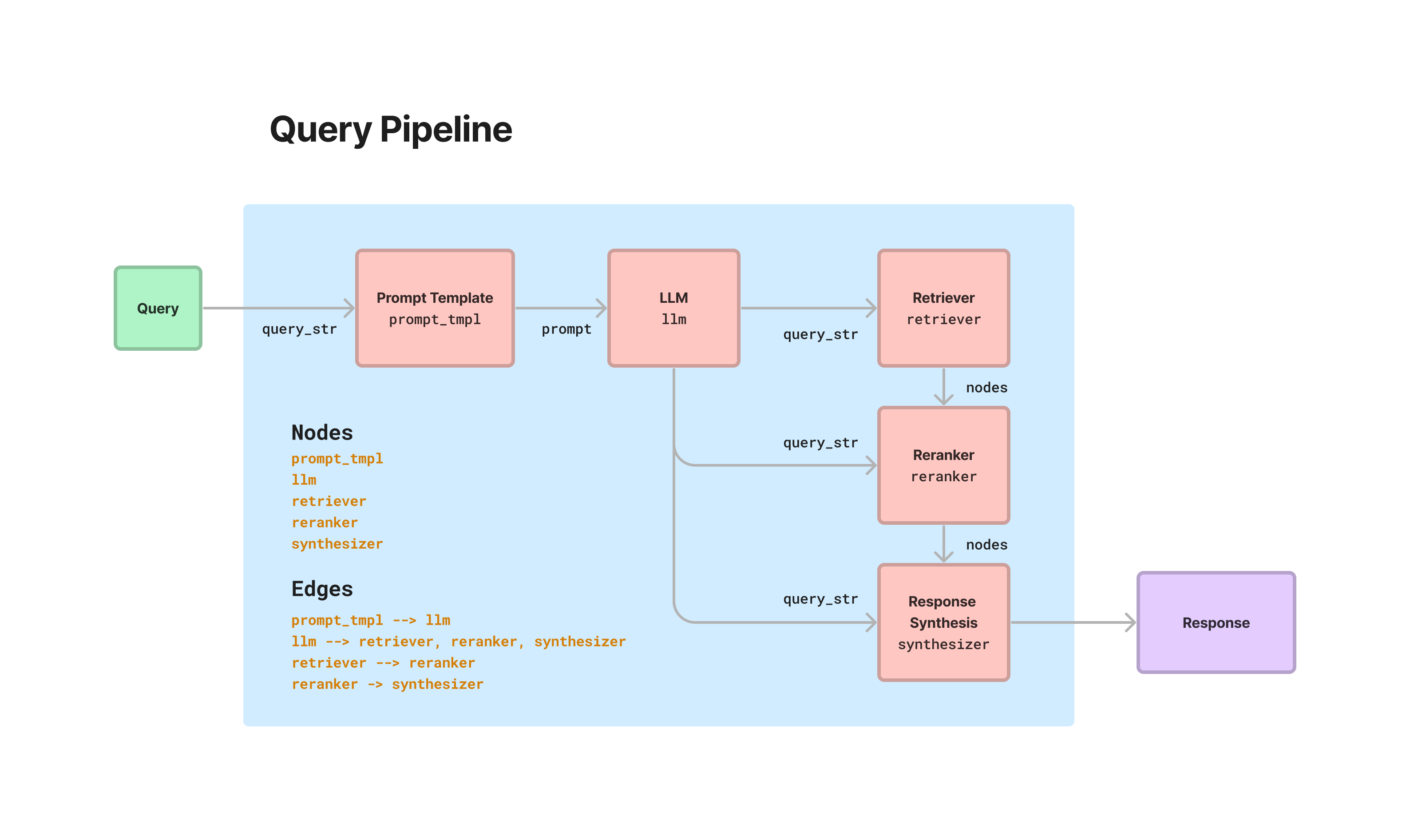
LlamaIndex 提供了一个声明式查询
API,允许将不同的模块串联起来,以便在数据上编排简单到高级的工作流程。这一切都围绕着
QueryPipeline 抽象。加载各种模块(从 LLM 到 prompt
到检索器再到其他流水线),将它们全部连接成一个顺序链或有向无环图
(DAG),并端到端运行。可以在没有声明式流水线抽象的情况下编排所有这些工作流程(通过使用模块命令式地并编写你自己的函数)。那么
QueryPipeline 的优势:
用更少的代码/样板表达常见工作流程
更高的可读性
与常见的低代码/无代码解决方案(例如
LangFlow)更好的一致性/更好的集成点
[未来]
声明式接口允许轻松序列化流水线组件,提供流水线的可移植性/更容易部署到不同的系统。
LlamaIndex的查询流水线还通过所有子模块传播回调,这些回调与可观测性工具集成$。
要查看 QueryPipeline 使用的交互式示例,请查看 RAG
CLI 。
7.1 使用示例
7.1.1 设置 Pipeline
有几种不同的方式来设置Query Pipeline。
定义 Sequential Chain
一些简单的管道本质上是纯线性的——前一个模块的输出直接进入下一个模块的输入。一些例子:
prompt -> LLM -> output parsing
prompt -> LLM -> prompt -> LLM
retriever -> response synthesizer
这些工作流程可以通过简化的链式语法在 QueryPipeline
中轻松表达。
1
2
3
4
5
6
7
8
from llama_index.core.query_pipeline import QueryPipeline"Please generate related movies to {movie_name}" "gpt-3.5-turbo" )True )
定义 DAG
许多Pipeline将需要设置一个 DAG(例如,如果想实现标准 RAG
Pipeline中的所有步骤)。 LlamaIndex提供了一个 lower-level API
来添加模块以及它们的keys,并定义前一个模块输出到下一个模块输入之间的链接。
1
2
3
4
5
6
7
8
9
10
11
12
13
14
15
16
17
18
19
20
21
22
23
24
25
26
27
28
from llama_index.postprocessor.cohere_rerank import CohereRerankfrom llama_index.core.response_synthesizers import TreeSummarize"Please generate a question about Paul Graham's life regarding the following topic {topic}" "gpt-3.5-turbo" )3 )True )"llm" : llm,"prompt_tmpl" : prompt_tmpl,"retriever" : retriever,"summarizer" : summarizer,"reranker" : reranker,"prompt_tmpl" , "llm" )"llm" , "retriever" )"retriever" , "reranker" , dest_key="nodes" )"llm" , "reranker" , dest_key="query_str" )"reranker" , "summarizer" , dest_key="nodes" )"llm" , "summarizer" , dest_key="query_str" )
7.1.2 运行Pipeline
Single-Input/Single-Output
输入是kwargs第一个组件。
如果最后一个组件的输出是单个对象(而不是对象字典),那么我们直接返回它。
以前面示例中的Pipeline为例,输出将是 Response
对象,因为最后一步是 TreeSummarize 响应合成模块。
1
2
3
output = p.run(topic="YC" )type (output)
Multi-Input/Multi-Output
如果 DAG
有多个根节点和/或输出节点,可以尝试用run_multi。传入一个包含模块的key -> input的字典。输出是模块key -> output的字典。
如果运行了前面的示例,
1
2
3
4
output_dict = p.run_multi({"llm" : {"topic" : "YC" }})print (output_dict)
定义partial
如果希望为模块预填某些输入,可以使用partial。然后 DAG
只需连接到未填充的输入即可。 需要通过 as_query_component
将模块转换。 以下是一个示例:
1
2
3
4
5
6
summarizer = TreeSummarize(llm=llm)"nodes" : nodes})"YC" )
中间输出
如果希望获取 QueryPipeline 中模块的中间输出,可以使用
run_with_intermediates 或
run_multi_with_intermediates 分别用于单输入和多输入。
输出将是一个元组,包括正常输出和一个包含模块
key -> ComponentIntermediates
的字典。ComponentIntermediates 有 2
个字段:inputs字典和outputs字典。
1
2
3
4
5
output, intermediates = p.run_with_intermediates(topic="YC" )print (output)print (intermediates)
7.1.3 定义自定义Query Component
可以轻松定义自定义组件:要么将函数传递给
FnComponent,要么继承
CustomQueryComponent。
将函数传递给 FnComponent
定义任何函数并将其传递给
FnComponent。位置参数名称(args)将被转换为必需的输入键,关键字参数名称(kwargs)将被转换为可选的输入键。
注:假设只有一个输出。
1
2
3
4
5
6
7
8
9
10
11
from llama_index.core.query_pipeline import FnComponentdef add (a: int , b: int ) -> int :"""Adds two numbers.""" return a + b"output" )
继承 CustomQueryComponent
简单地继承 CustomQueryComponent,实现验证/运行函数 +
一些助手,并将其插入。
1
2
3
4
5
6
7
8
9
10
11
12
13
14
15
16
17
18
19
20
21
22
23
24
25
26
27
28
29
30
31
32
from llama_index.core.query_pipeline import CustomQueryComponentfrom typing import Dict , Any class MyComponent (CustomQueryComponent ):"""My component.""" def _validate_component_inputs ( self, input : Dict [str , Any ] ) -> Dict [str , Any ]:"""Validate component inputs during run_component.""" return input @property def _input_keys (self ) -> set :"""Input keys dict.""" return {"input_key1" , ...} @property def _output_keys (self ) -> set :return {"output_key" }def _run_component (self, **kwargs ) -> Dict [str , Any ]:"""Run the component.""" return {"output_key" : result}
query
transformations guide
7.1.4 确保输出兼容
通过在 QueryPipeline
中链接模块,一个模块的输出进入下一个模块的输入。
通常,必须确保链接正常工作,预期的输出和输入类型大致对齐。LlamaIndex对现有模块做了一些魔法,以确保“可字符串化(Stringable)”输出可以传递到可以作为“字符串”查询的输入中。
某些输出类型被视为 Stringable -
CompletionResponse、ChatResponse、Response、QueryBundle
等。检索器/查询引擎将自动将字符串输入转换为 QueryBundle
对象。
这使您能够执行某些工作流程,如果自己编写,则需要编写样板字符串转换,例如,
LLM -> prompt, LLM -> retriever, LLM -> query engine
query engine -> prompt, query engine -> retriever
自定义组件,应该使用 _validate_component_inputs
确保输入是正确的类型,并在它们不是时抛出错误。
7.2 Module Guides
7.3 Module Usage
在 QueryPipeline 中支持以下 LlamaIndex 模块(也可以自定义)
7.3.1 LLMs(包括完成和聊天)
Base class:LLM
Module
Guide Chat model:
Input: messages。接受任何
List[ChatMessage] 或任何可字符串化输入。
Output: output。输出
ChatResponse(可字符串化)
Completion model:
Input: prompt. 接受任何可字符串化输入。
Output: output. 输出
CompletionResponse(可字符串化)
7.3.2 Prompts
Base class: PromptTemplate
Module
Guide Input: Prompt template variables.
每个变量可以是可字符串化输入。
Output: output.
输出格式化的提示字符串(可字符串化)
7.3.3 Query Engines
Base class: BaseQueryEngine
Module
Guide Input: input. 接受任何可字符串化输入。
Output: output.
输出Response(可字符串化)
Base class: BaseQueryTransform
Module
Guide Input: query_str,
metadata(可选)。query_str
是任何可字符串化输入。
Output: query_str. 输出字符串。
7.3.5 Retrievers
Base class: BaseRetriever
Module
Guide Input: input. 接受任何可字符串化输入。
Output: output. 输出节点列表
List[BaseNode]
7.3.6 Output Parsers
Base class:BaseOutputParser
Module
Guide Input: input. 接受任何可字符串化输入
Output: output.
输出输出解析器应该解析出的任何类型。
7.3.7 Postprocessors/Rerankers
Base class: BaseNodePostprocessor
Module
Guide Input: nodes, query_str (可选).
nodes是 List[BaseNode], query_str
是任何可字符串化输入.
Output: nodes. 输出节点列表
List[BaseNode].
7.3.8 Response Synthesizers
Base class: BaseSynthesizer
Module
Guide Input: nodes, query_str.
nodes 是 List[BaseNode],
query_str 是任何可字符串化输入.
Output: output. 输出 Response
对象(可字符串化).
7.3.9 Other QueryPipeline
objects
You can define a QueryPipeline as a module within another query
pipeline. This makes it easy for you to string together complex
workflows.
Custom
Components
八、Structured Outputs
LLM产生结构化输出的能力对于依赖于可靠解析输出值的下游应用来说非常重要。LlamaIndex
本身在以下几个方面依赖于结构化输出:
Document retrieval :LlamaIndex
中的许多数据结构依赖于具有特定文档检索模式的 LLM 调用。 例如,树索引期望
LLM 调用的格式为ANSWER:(number)。Response
synthesis :用户可能期望最终响应包含某种程度的结构(例如 JSON
输出、格式化的 SQL 查询等)
LlamaIndex 提供了多种模块,使 LLM
能够以结构化格式产生输出。LlamaIndex提供了不同抽象层次的模块:
Output Parsers : 这些是在 LLM
文本完成之前和之后运行的模块。 它们不与 LLM
函数调用一起使用(因为它们包含开箱即用的结构化输出)。Pydantic Programs : 这些是将输入prompt映射到由
Pydantic 对象表示的结构化输出的通用模块。
他们可能使用function calling API或text completion APIs + output parsers。
这些也可以与查询引擎集成。Pre-defined Pydantic Program : 预定义的 Pydantic
程序,可将输入映射到特定的输出类型(如dataframes)。
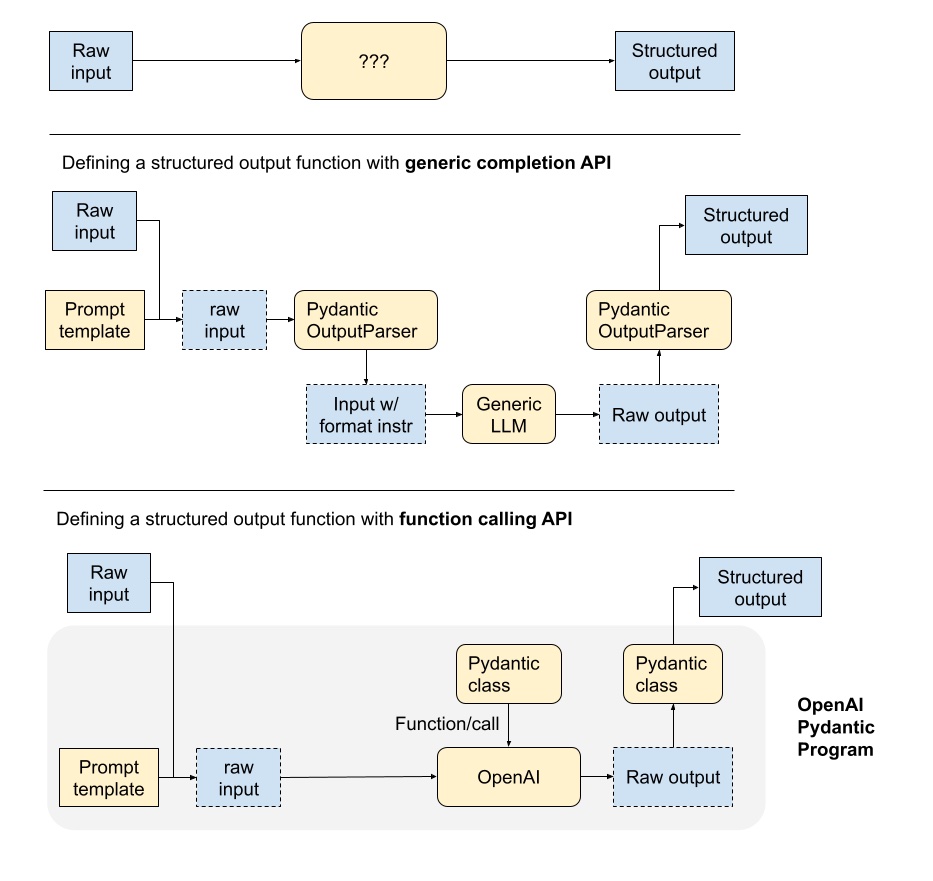
8.1 结构化输出函数剖析
在这里,描述了 LLM 支持的结构化输出函数的不同组件。
pipeline取决于使用的是generic LLM text completion API或LLM function calling API。
使用generic completion APIs,输入和输出由文本prompts处理。
输出解析器在 LLM 调用之前和之后发挥作用,以确保结构化输出。 在 LLM
调用之前,输出解析器可以将格式指令附加到prompts中。
LLM调用后,输出解析器可以将输出解析为指定的指令。
function calling APIs,输出本质上是结构化格式,并且输入可以采用所需对象的签名。
结构化输出只需要转换为正确的对象格式(例如 Pydantic)。
8.2 Output Parsing Modules
LlamaIndex 支持与其他框架提供的输出解析模块集成。
这些输出解析模块可以通过以下方式使用:
为任何prompt/query
提供格式化指令(通过output_parser.format)
为LLM输出提供“解析”(通过output_parser.parse)
8.2.1 Guardrails
Guardrails 是一个开源的 Python
包,用于输出模式的规范/验证/校正。以下是代码示例。
1
2
3
4
5
6
7
8
9
10
11
12
13
14
15
16
17
18
19
20
21
22
23
24
25
26
27
28
29
30
31
32
33
34
35
36
37
38
39
40
41
42
43
44
45
46
47
48
49
50
from llama_index.core import VectorStoreIndex, SimpleDirectoryReaderfrom llama_index.output_parsers.guardrails import GuardrailsOutputParserfrom llama_index.llms.openai import OpenAI"../paul_graham_essay/data" ).load_data()512 )""" <rail version="0.1"> <output> <list name="points" description="Bullet points regarding events in the author's life."> <object> <string name="explanation" format="one-line" on-fail-one-line="noop" /> <string name="explanation2" format="one-line" on-fail-one-line="noop" /> <string name="explanation3" format="one-line" on-fail-one-line="noop" /> </object> </list> </output> <prompt> Query string here. @xml_prefix_prompt {output_schema} @json_suffix_prompt_v2_wo_none </prompt> </rail> """ "What are the three items the author did growing up?" ,print (response)
输出
1 {'points': [{'explanation': 'Writing short stories', 'explanation2': 'Programming on an IBM 1401', 'explanation3': 'Using microcomputers'}]}
8.2.2 Langchain
Langchain 也提供了输出解析模块,可以在 LlamaIndex 中使用。
1
2
3
4
5
6
7
8
9
10
11
12
13
14
15
16
17
18
19
20
21
22
23
24
25
26
27
28
29
30
31
32
33
34
35
36
37
from llama_index.core import VectorStoreIndex, SimpleDirectoryReaderfrom llama_index.core.output_parsers import LangchainOutputParserfrom llama_index.llms.openai import OpenAIfrom langchain.output_parsers import StructuredOutputParser, ResponseSchema"../paul_graham_essay/data" ).load_data()"Education" ,"Describes the author's educational experience/background." ,"Work" ,"Describes the author's work experience/background." ,"What are a few things the author did growing up?" ,print (str (response))
输出
1 {'Education': 'Before college, the author wrote short stories and experimented with programming on an IBM 1401.', 'Work': 'The author worked on writing and programming outside of school.'}
更多例子:
8.3 Query Engines + Pydantic
Outputs
使用index.as_query_engine()及其底层的RetrieverQueryEngine,LlamaIndex可以支持结构化的pydantic输出,而无需额外的LLM调用(与典型的输出解析器相比)。
每个查询引擎都支持使用 RetrieverQueryEngine 中的以下
response_modes 集成结构化响应:
refinecompacttree_summarizeaccumulate (beta, 需要额外解析以转换为对象)compact_accumulate (beta,
需要额外解析以转换为对象)
在底层,这取决于LLM的设置,使用 OpenAIPydanitcProgam 或
LLMTextCompletionProgram。如果有中间的 LLM 响应(例如在
refine 或 tree_summarize 期间进行了多次 LLM
调用),Pydantic 对象会以 JSON 对象的形式注入到下一个 LLM prompt中。
8.3.1 使用示例
首先,需要定义要提取的对象。
1
2
3
4
5
6
7
8
9
10
from typing import List from pydantic import BaseModelclass Biography (BaseModel ):"""Data model for a biography.""" str List [str ]str
然后,创建查询引擎
1
2
3
query_engine = index.as_query_engine("tree_summarize" , output_cls=Biography
最后,获取响应并检查输出。
1
2
3
4
5
6
7
8
response = query_engine.query("Who is Paul Graham?" )print (response.name)print (response.best_known_for)print (response.extra_info)
更多例子:
8.4 Pydantic Program
Pydantic
程序是一种通用的抽象,它接收一个输入字符串并将其转换为一个结构化的
Pydantic 对象类型。由于这种抽象非常通用,它涵盖了广泛的 LLM
工作流程。程序是可组合的,可以用于更通用或特定的用例。
Pydantic 程序有几种一般类型:
Text Completion Pydantic Programs :
这些程序通过text completion API + output parsing,将输入文本转换为用户指定的结构化对象。Function Calling Pydantic Program : 这些程序通过 LLM
function calling API,将输入文本转换为用户指定的结构化对象。Prepackaged Pydantic Programs :
这些程序将输入文本转换为预指定的结构化对象。
8.4.1 Text Completion
Pydantic Programs
8.4.2 Function Calling
Pydantic Programs
8.4.3 Prepackaged Pydantic
Programs
官方资源