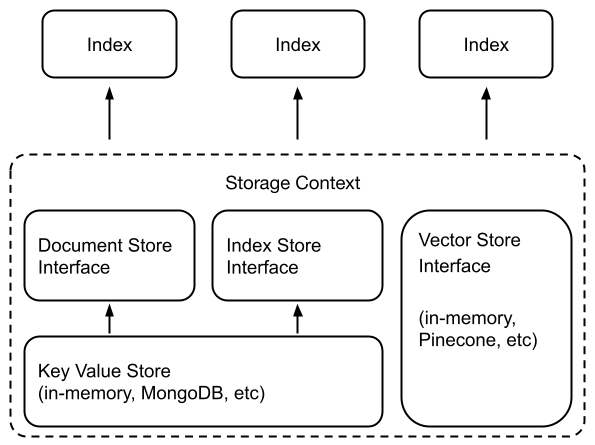
一、简介
LlamaIndex
提供了一个高级接口,用于提取、索引和查询您的外部数据。在底层,LlamaIndex
还支持可互换的存储组件,允许您自定义:
Document stores: 存储提取的文档(即,Node 对象)的地方
Index stores: 存储索引元数据的地方
Vector stores: 存储向量的地方
Graph stores: 存储知识图谱的地方(即 KnowledgeGraphIndex)
Chat Stores: 存储和组织聊天记录的地方
文档/索引存储依赖于一个共同的键值存储抽象。LlamaIndex
支持将数据持久化到 fsspec
支持的任何存储后端。已确认支持以下存储后端:
本地文件系统
AWS S3
Cloudflare R2
1.1 使用示例
许多向量存储(除了
FAISS)会同时存储数据和索引(embeddings)。这意味着不需要使用单独的文档存储或索引存储。这也意味着不需要显式地持久化这些数据
- 这会自动发生。构建新索引/重新加载现有索引的用法可能如下所示。
1 2 3 4 5 6 7 8 9 10 11 12 13 14 15 from llama_index.core import VectorStoreIndex, StorageContextfrom llama_index.vector_stores.deeplake import DeepLakeVectorStore"<dataset_path>" )
通常要使用存储抽象,需要定义一个 StorageContext
对象:
1
2
3
4
5
6
7
8
9
10
11
from llama_index.core.storage.docstore import SimpleDocumentStorefrom llama_index.core.storage.index_store import SimpleIndexStorefrom llama_index.core.vector_stores import SimpleVectorStorefrom llama_index.core import StorageContext
二、Vector Stores
向量存储包含被提取文档块的向量(有时也包含文档块本身)。
2.1 简单向量存储
默认情况下,LlamaIndex 使用一个简单的内存向量存储,非常适合快速实验。
它们可以通过调用 vector_store.persist()(以及
SimpleVectorStore.from_persist_path(...)
)保存到磁盘上(并从磁盘加载)。
LlamaIndex 支持超过 20 种不同的向量存储选项。具体可查看:https://docs.llamaindex.ai/en/stable/community/integrations/vector_stores/
三、Document Stores
文档存储包含了已提取的文档块,称之为节点对象(Node objects)API
Reference
3.1 简单文档存储
默认情况下,SimpleDocumentStore
将节点对象存储在内存中。可以通过调用
docstore.persist()(以及
SimpleDocumentStore.from_persist_path(...))将它们持久化到磁盘(并从磁盘加载)。
完整例子
3.2 MongoDB 文档存储
LlamaIndex支持 MongoDB
作为另一种文档存储后端,它在提取节点对象时持久化数据。
1
2
3
4
5
6
7
8
9
10
11
12
13
14
15
16
from llama_index.storage.docstore.mongodb import MongoDocumentStorefrom llama_index.core.node_parser import SentenceSplitter"<mongodb+srv://...>" )
在底层,MongoDocumentStore 连接到一个固定的
MongoDB
数据库,并将节点初始化新集合(或加载现有集合)。在实例化
MongoDocumentStore 时,可以配置 db_name 和
namespace,否则它们默认为
db_name="db_docstore" 和
namespace="docstore"。当使用
MongoDocumentStore 时,不必调用
storage_context.persist()(或
docstore.persist()),因为数据默认情况下会被持久化。
可以通过使用现有的 db_name 和
collection_name 重新初始化
MongoDocumentStore,轻松地重新连接到 MongoDB
集合并重新加载索引。
完整的示例
3.3 Redis 文档存储
LlamaIndex支持 Redis
作为另一种文档存储后端,它在提取节点对象时持久化数据。
1
2
3
4
5
6
7
8
9
10
11
12
13
14
15
16
17
18
from llama_index.storage.docstore.redis import RedisDocumentStorefrom llama_index.core.node_parser import SentenceSplitter"127.0.0.1" , port="6379" , namespace="llama_index"
在底层,RedisDocumentStore 连接到一个 redis
数据库,并将您的节点添加到一个存储在 {namespace}/docs
下的命名空间中。在实例化 RedisDocumentStore
时,可以配置命名空间,否则它默认为
namespace="docstore"。可以通过使用现有的
host、port 和 namespace 重新初始化
RedisDocumentStore,轻松地重新连接到 Redis
客户端并重新加载索引。
完整的示例
3.4 Firestore 文档存储
LlamaIndex支持 Firestore
作为另一种文档存储后端,它在提取节点对象时持久化数据。
1
2
3
4
5
6
7
8
9
10
11
12
13
14
15
16
17
18
19
from llama_index.storage.docstore.firestore import FirestoreDocumentStorefrom llama_index.core.node_parser import SentenceSplitter"project-id" ,"(default)" ,
在底层,FirestoreDocumentStore 连接到
Google Cloud 中的 firestore
数据库,并将节点添加到存储在 {namespace}/docs
下的命名空间中。在实例化 FirestoreDocumentStore
时,您可以配置命名空间,否则它默认为
namespace="docstore"。可以通过使用现有的
project、database 和 namespace
重新初始化FirestoreDocumentStore,轻松地重新连接到
Firestore 数据库并重新加载索引。
完整的示例
四、Index Stores
索引存储包含轻量级索引元数据(即构建索引时创建的附加状态信息)。API
Reference
4.1 简单索引存储
默认情况下,LlamaIndex
使用一个简单的索引存储,该存储由内存中的键值存储支持。它们可以通过调用
index_store.persist()(以及
SimpleIndexStore.from_persist_path(...))持久化到磁盘并从磁盘加载。
4.2 MongoDB 索引存储
类似于文档存储,LlamaIndex也可以将 MongoDB
用作索引存储的存储后端。
1
2
3
4
5
6
7
8
9
10
11
12
13
14
15
16
from llama_index.storage.index_store.mongodb import MongoIndexStorefrom llama_index.core import VectorStoreIndex"<mongodb+srv://...>" )from llama_index.core import load_index_from_storage
在底层,MongoIndexStore 连接到一个固定的
MongoDB
数据库,并为索引元数据初始化新集合(或加载现有集合)。可以在实例化
MongoIndexStore 时配置 db_name 和
namespace,否则它们默认为
db_name="db_docstore" 和
namespace="docstore"。当使用 MongoIndexStore
时,没有必要调用 storage_context.persist()(或
index_store.persist()),因为数据默认情况下会被持久化。可以通过使用现有的
db_name 和 collection_name 重新初始化
MongoIndexStore,轻松地重新连接到 MongoDB
集合并重新加载索引。
完整的示例
4.3 Redis 索引存储
LlamaIndex支持 Redis
作为另一种文档存储后端,它在提取节点对象时持久化数据。
1
2
3
4
5
6
7
8
9
10
11
12
13
14
15
16
17
18
from llama_index.storage.index_store.redis import RedisIndexStorefrom llama_index.core import VectorStoreIndex"127.0.0.1" , port="6379" , namespace="llama_index" from llama_index.core import load_index_from_storage
在底层,RedisIndexStore 连接到一个 redis
数据库,并将节点添加到一个存储在 {namespace}/index
下的命名空间中。可以在实例化 RedisIndexStore
时配置命名空间,否则它默认为
namespace="index_store"。可以通过使用现有的host,port和namespace重新初始化
RedisIndexStore,轻松地重新连接到 Redis
客户端并重新加载索引。
完整的示例
五、Chat Stores
聊天存储充当一个集中的接口来存储聊天记录。与其他存储格式相比,聊天记录是独特的,因为消息的顺序对于维持整个对话至关重要。
聊天存储可以通过键(如user_ids或其他唯一可识别的字符串)组织聊天消息序列,并处理删除、插入和获取操作。
5.1 SimpleChatStore
最基本的聊天存储是SimpleChatStore,它将消息存储在内存中,并且可以保存到/从磁盘,或者可以序列化并存储在其他地方。
通常,将实例化一个聊天存储并将其提供给一个记忆模块。使用聊天存储的记忆模块将默认使用SimpleChatStore。
1
2
3
4
5
6
7
8
9
10
from llama_index.core.storage.chat_store import SimpleChatStorefrom llama_index.core.memory import ChatMemoryBuffer3000 ,"user1" ,
一旦创建了记忆,可以将其包含在代理或聊天引擎中:
1
2
3
agent = OpenAIAgent.from_tools(tools, memory=memory)
为了稍后保存聊天存储,可以通过磁盘保存/加载
1 2 3 4 chat_store.persist(persist_path="chat_store.json" )"chat_store.json"
或者可以将聊天存储转换为字符串,然后将其保存在其他地方
1
2
chat_store_string = chat_store.json()
5.2 RedisChatStore
使用RedisChatStore,可以远程存储聊天记录,而无需担心手动持久化和加载聊天记录。
1
2
3
4
5
6
7
8
9
10
from llama_index.storage.chat_store.redis import RedisChatStorefrom llama_index.core.memory import ChatMemoryBuffer"redis://localhost:6379" , ttl=300 )3000 ,"user1" ,
六、Key-Value Stores
键值存储是Document Stores 和Index Stores 背后的基础存储抽象。
提供以下键值存储:
API
Reference
七、Persisting & Loading
Data
7.1 持久化数据
默认情况下,LlamaIndex
将数据存储在内存中,如果需要,可以显式地将数据持久化到磁盘:
1 storage_context.persist(persist_dir="<persist_dir>" )
这将把数据持久化到磁盘,在指定的 persist_dir(或默认的
./storage)下。
可以在同一目录下持久化并从该目录加载多个索引,假设你在加载时能跟踪索引
ID。 用户还可以配置其他存储后端(例如
MongoDB),这些后端默认会持久化数据。在这种情况下,调用
storage_context.persist() 将不执行任何操作。
7.2 加载数据
要加载数据,用户只需使用相同的配置重新创建存储上下文(例如,传入相同的
persist_dir 或向量存储客户端)。
1
2
3
4
5
6
7
storage_context = StorageContext.from_defaults("<persist_dir>" ),"<persist_dir>" "<persist_dir>" ),
然后,可以通过以下便捷函数从 StorageContext
加载特定的索引。
1
2
3
4
5
6
7
8
9
10
11
12
13
14
15
16
17
18
19
20
21
22
23
from llama_index.core import ("<index_id>" )"<root_id>"
7.3 使用远程后端
默认情况下,LlamaIndex
使用本地文件系统加载和保存文件。但是,可以通过传递一个
fsspec.AbstractFileSystem 对象来覆盖这个行为。
以下是一个简单的例子,实例化一个向量存储:
1
2
3
4
5
6
7
8
9
10
11
12
import dotenvimport s3fsimport os"../../../.env" )"../../../examples/paul_graham_essay/data/" print (len (documents))
实例化一个 S3 文件系统,并从那里保存 / 加载。
1 2 3 4 5 6 7 8 9 10 11 12 13 14 15 16 17 18 19 20 21 22 23 24 25 26 27 "AWS_ACCESS_KEY_ID" ]"AWS_SECRET_ACCESS_KEY" ]"R2_ACCOUNT_ID" ]assert AWS_KEY is not None and AWS_KEY != "" f"https://{R2_ACCOUNT_ID} .r2.cloudflarestorage.com" ,"ACL" : "public-read" },"vector_index" )"llama-index/storage_demo" "vector_index" ,
默认情况下,如果没有传递一个文件系统,将使用本地文件系统。
八、Customizing Storage
LlamaIndex 隐藏了复杂性,可以在不到五行代码的情况下查询您的数据:
1
2
3
4
5
6
from llama_index.core import VectorStoreIndex, SimpleDirectoryReader"data" ).load_data()"Summarize the documents." )
在底层,LlamaIndex 还支持可互换的存储层,允许自定义存储提取的文档(即
Node 对象)、embedding vectors和索引元数据的位置。
8.1 Low-Level API
high-level API
1 index = VectorStoreIndex.from_documents(documents)
Low-Level API提供了更细粒度的控制:
1
2
3
4
5
6
7
8
9
10
11
12
13
14
15
16
17
18
19
20
21
22
23
24
25
26
27
28
29
30
31
32
33
34
35
36
37
38
39
40
41
42
43
44
45
from llama_index.core.storage.docstore import SimpleDocumentStorefrom llama_index.core.storage.index_store import SimpleIndexStorefrom llama_index.core.vector_stores import SimpleVectorStorefrom llama_index.core.node_parser import SentenceSplitter"<persist_dir>" )"<index_id>" )"<persist_dir>" )"<persist_dir>" )from llama_index.core import load_index_from_storage"<index_id>" )"<index_id>" , ...]
可以通过一行代码更改实例化不同的文档存储 、索引存储 和向量存储 ,来自定义底层存储。
8.2 向量存储集成和存储
LlamaIndex的大多数向量存储集成将整个索引(向量 +
文本)存储在向量存储本身中。这带来了一个主要的好处,即不必像上面所示明确地持久化索引,因为向量存储已经托管并持久化了索引中的数据。
支持这种做法的向量存储有:
AzureAISearchVectorStore
ChatGPTRetrievalPluginClient
CassandraVectorStore
ChromaVectorStore
EpsillaVectorStore
DocArrayHnswVectorStore
DocArrayInMemoryVectorStore
JaguarVectorStore
LanceDBVectorStore
MetalVectorStore
MilvusVectorStore
MyScaleVectorStore
OpensearchVectorStore
PineconeVectorStore
QdrantVectorStore
RedisVectorStore
UpstashVectorStore
WeaviateVectorStore
使用 Pinecone 的一个示例:
1
2
3
4
5
6
7
8
9
10
11
12
13
14
15
16
17
18
19
20
21
22
23
24
25
import pineconefrom llama_index.core import VectorStoreIndex, SimpleDirectoryReaderfrom llama_index.vector_stores.pinecone import PineconeVectorStore"api_key" "us-west1-gcp" )"quickstart" , dimension=1536 , metric="euclidean" , pod_type="p1" "quickstart" )"./data" ).load_data()
如果有一个已经加载了数据的现有向量存储,可以连接到它并直接创建
VectorStoreIndex,如下所示:
1
2
3
index = pinecone.Index("quickstart" )
官方资源