RAG

一、RAG

1.1 RAG是什么

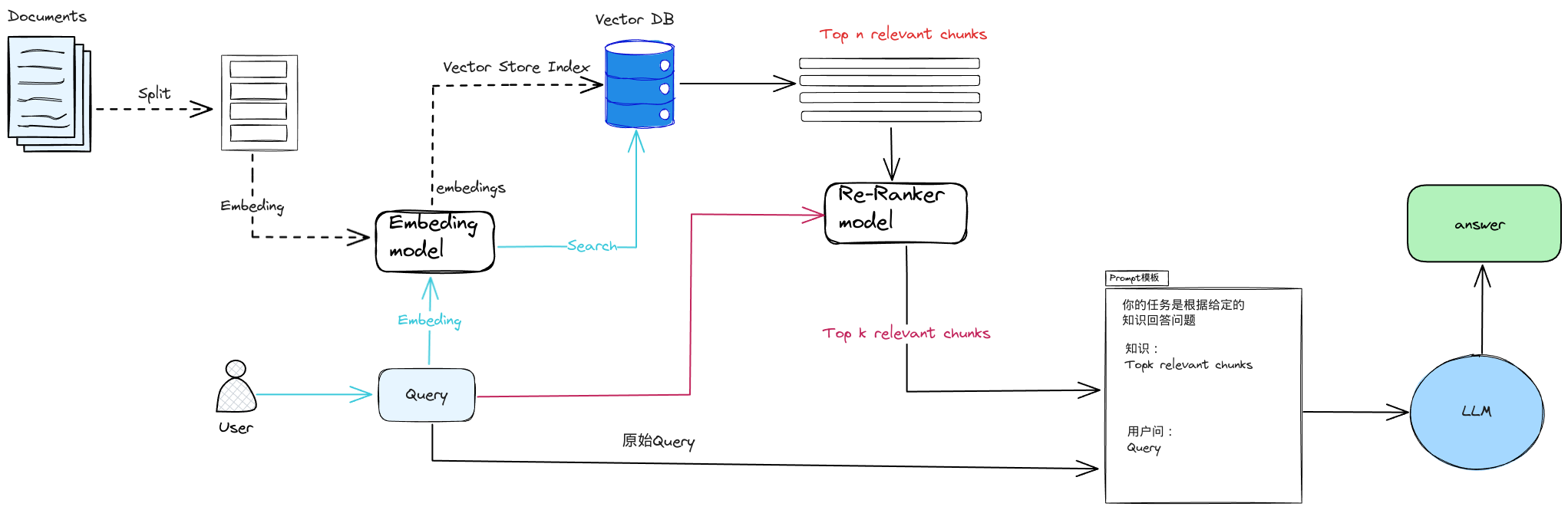
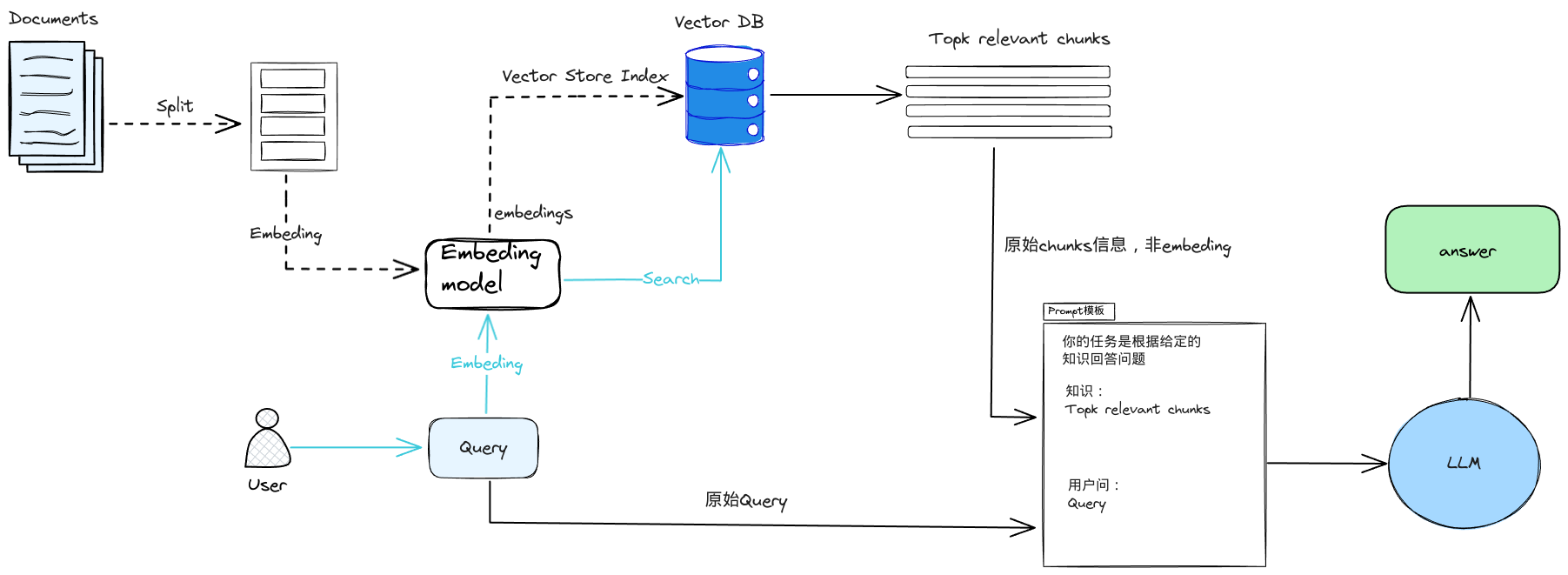
RAG(Retrieval Augmented Generation)顾名思义,通过检索的方法来增强生成模型的能力。简而言之,RAG 结合了搜索技术和大语言模型的提示功能,即模型根据搜索算法找到的信息作为上下文来回答查询问题。无论是查询还是检索的上下文,都会被整合到发给大语言模型的提示中。

1.2 为什么要有 RAG

LLM 固有的局限性

  1. LLM 的知识不是实时的
  2. LLM 可能不知道你私有的领域/业务知识
  3. 对于企业来说,并不希望将自己的数据和文档上传到互联网上的LLM

1.3 RAG 的机制

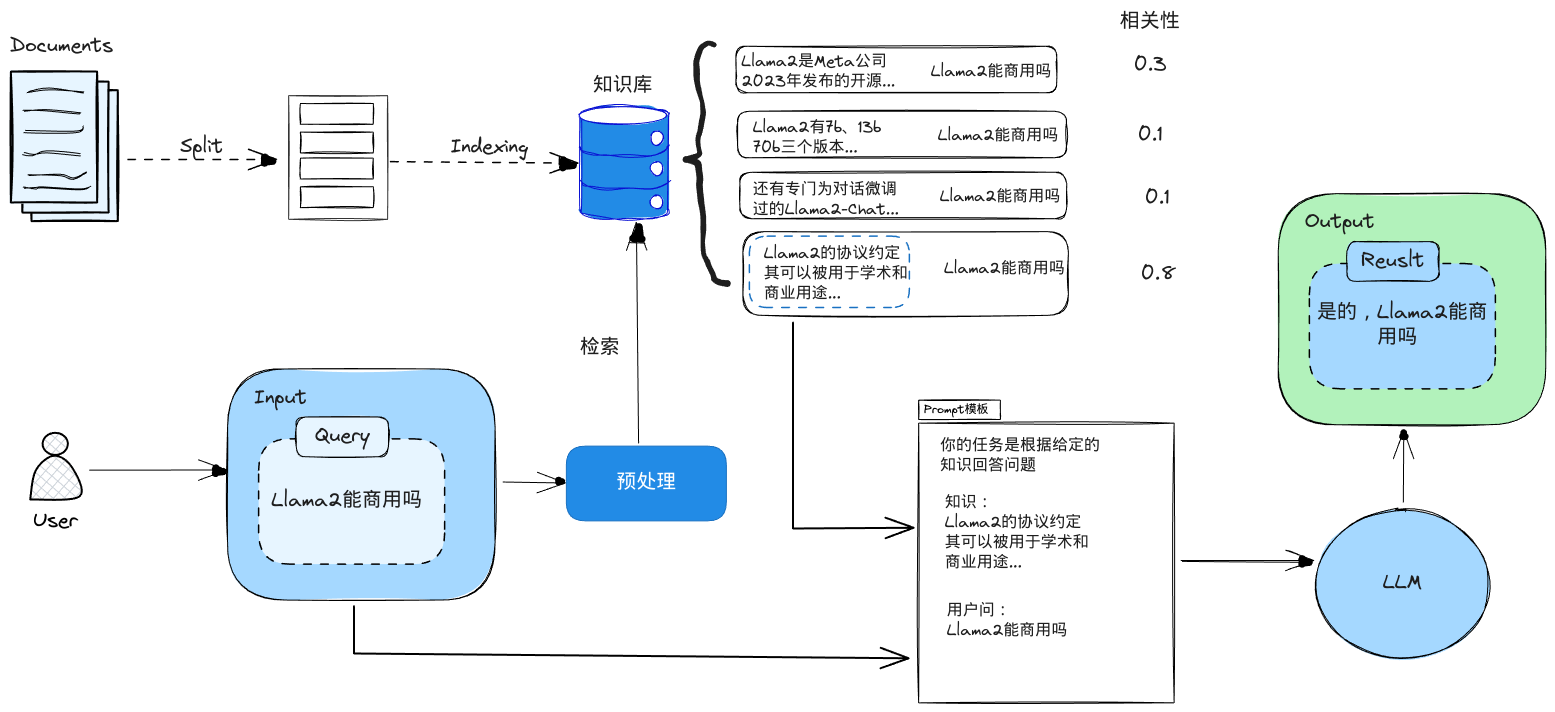
你可以把这个过程想象成开卷考试。让 LLM 先翻书,再回答问题。

二、最基本的RAG系统搭建

搭建过程:

  1. 文档加载,并按一定条件切割成片段
  2. 将切割的文本片段灌入检索引擎
  3. 封装检索接口
  4. 构建调用流程:Query -> 检索 -> Prompt -> LLM -> 回复

2.1 文档的加载与切割

LLM的输入序列长度是固定的,即便现在很多LLM上下文窗口很大,但相比与比较长的文本的平均向量,一句话或几句话的向量更能准确的代表语义含义。因此,你需要将数据进行分块 —— 把初始文档分成一些块,每块大小适中,既不丢失原有的含义。

1
2
# 安装 pdf 解析库
pip install pdfminer.six
1
2
3
4
5
6
7
8
9
10
11
12
13
14
15
16
17
18
19
20
21
22
23
24
25
26
27
28
29
30
31
32
33
34
35
36
import random
from http import HTTPStatus
from dashscope import Generation
from pdfminer.high_level import extract_pages
from pdfminer.layout import LTTextContainer

def extract_text_from_pdf(filename, page_numbers=None, min_line_length=1):
'''从 PDF 文件中(按指定页码)提取文字'''
paragraphs = []
buffer = ''
full_text = ''
# 提取全部文本
for i, page_layout in enumerate(extract_pages(filename)):
# 如果指定了页码范围,跳过范围外的页
if page_numbers is not None and i not in page_numbers:
continue
for element in page_layout:
if isinstance(element, LTTextContainer):
full_text += element.get_text() + '\n'
# 按空行分隔,将文本重新组织成段落
lines = full_text.split('\n')
for text in lines:
if len(text) >= min_line_length:
buffer += (' '+text) if not text.endswith('-') else text.strip('-')
elif buffer:
paragraphs.append(buffer)
buffer = ''
if buffer:
paragraphs.append(buffer)
return paragraphs

paragraphs = extract_text_from_pdf("llama2.pdf", min_line_length=10) #llama2.pdf是llama2原始论文

for para in paragraphs[:3]:
print(para+"\n")

1
2
3
4
5
Llama 2: Open Foundation and Fine-Tuned Chat Models

Hugo Touvron∗ Louis Martin† Kevin Stone† Peter Albert Amjad Almahairi Yasmine Babaei Nikolay Bashlykov Soumya Batra Prajjwal Bhargava Shruti Bhosale Dan Bikel Lukas Blecher Cristian Canton Ferrer Moya Chen Guillem Cucurull David Esiobu Jude Fernandes Jeremy Fu Wenyin Fu Brian Fuller Cynthia Gao Vedanuj Goswami Naman Goyal Anthony Hartshorn Saghar Hosseini Rui Hou Hakan Inan Marcin Kardas Viktor Kerkez Madian Khabsa Isabel Kloumann Artem Korenev Punit Singh Koura Marie-Anne Lachaux Thibaut Lavril Jenya Lee Diana Liskovich Yinghai Lu Yuning Mao Xavier Martinet Todor Mihaylov Pushkar Mishra Igor Molybog Yixin Nie Andrew Poulton Jeremy Reizenstein Rashi Rungta Kalyan Saladi Alan Schelten Ruan Silva Eric Michael Smith Ranjan Subramanian Xiaoqing Ellen Tan Binh Tang Ross Taylor Adina Williams Jian Xiang Kuan Puxin Xu Zheng Yan Iliyan Zarov Yuchen Zhang Angela Fan Melanie Kambadur Sharan Narang Aurelien Rodriguez Robert Stojnic Sergey Edunov Thomas Scialom∗

GenAI, Meta

2.2 实现检索引擎

我们首先实现一个基于ES的关键词查找的检索引擎

文本处理

1
2
3
4
5
6
7
8
9
10
11
12
13
14
15
16
17
18
19
20
21
22
23
24
25
from elasticsearch7 import Elasticsearch, helpers
from nltk.stem import PorterStemmer
from nltk.tokenize import word_tokenize
from nltk.corpus import stopwords
import nltk
import re

import warnings
warnings.simplefilter("ignore") # 屏蔽 ES 的一些Warnings

nltk.download('punkt') # 英文切词、词根、切句等方法
nltk.download('stopwords') # 英文停用词库

def to_keywords(input_string):
'''(英文)文本只保留关键字'''
# 使用正则表达式替换所有非字母数字的字符为空格
no_symbols = re.sub(r'[^a-zA-Z0-9\s]', ' ', input_string)
word_tokens = word_tokenize(no_symbols)
# 加载停用词表
stop_words = set(stopwords.words('english'))
ps = PorterStemmer()
# 去停用词,取词根
filtered_sentence = [ps.stem(w)
for w in word_tokens if not w.lower() in stop_words]
return ' '.join(filtered_sentence)

将文本灌入检索引擎

1
2
3
4
5
6
7
8
9
10
11
12
13
14
15
16
17
18
19
20
21
22
23
24
25
26
27
28
29
30
# 1. 创建Elasticsearch连接
es = Elasticsearch(
hosts=['http://ip:port'], # 服务地址与端口
http_auth=("es_user", "es_password"), # 用户名,密码
)

# 2. 定义索引名称
index_name = "llama2_demo_tmp"

# 3. 如果索引已存在,删除它(仅供演示,实际应用时不需要这步)
if es.indices.exists(index=index_name):
es.indices.delete(index=index_name)

# 4. 创建索引
es.indices.create(index=index_name)

# 5. 灌库指令
actions = [
{
"_index": index_name,
"_source": {
"keywords": to_keywords(para),
"text": para
}
}
for para in paragraphs
]

# 6. 文本灌库
helpers.bulk(es, actions)

实现关键字检索

1
2
3
4
5
6
7
8
9
10
11
12
13
def search(query_string, top_n=3):
# ES 的查询语言
search_query = {
"match": {
"keywords": to_keywords(query_string)
}
}
res = es.search(index=index_name, query=search_query, size=top_n)
return [hit["_source"]["text"] for hit in res["hits"]["hits"]]

results = search("how many parameters does llama 2 have?", 2)
for r in results:
print(r+"\n")
1
2
3
1. Llama 2, an updated version of Llama 1, trained on a new mix of publicly available data. We also increased the size of the pretraining corpus by 40%, doubled the context length of the model, and adopted grouped-query attention (Ainslie et al., 2023). We are releasing variants of Llama 2 with 7B, 13B, and 70B parameters. We have also trained 34B variants, which we report on in this paper but are not releasing.§

In this work, we develop and release Llama 2, a collection of pretrained and fine-tuned large language models (LLMs) ranging in scale from 7 billion to 70 billion parameters. Our fine-tuned LLMs, called Llama 2-Chat, are optimized for dialogue use cases. Our models outperform open-source chat models on most benchmarks we tested, and based onour human evaluations for helpfulness and safety, may be a suitable substitute for closed source models. We provide a detailed description of our approach to fine-tuning and safety improvements of Llama 2-Chat in order to enable the community to build on our work and contribute to the responsible development of LLMs.

2.3、LLM 接口封装

使用qwen-max模型做演示

1
2
3
4
5
6
7
8
9
10
11
12
13
import random
from dashscope import Generation

def get_completion(prompt, model="qwen-max"):
'''封装 qwen 接口'''
messages = [{"role": "user", "content": prompt}]
response = Generation.call("qwen-turbo",
messages=messages,
# 设置随机数种子seed,如果没有设置,则随机数种子默认为1234
seed=random.randint(1, 10000),
# 将输出设置为"message"格式
result_format='message')
return response.output.choices[0].message.content

2.4、Prompt构建

1
2
3
4
5
6
7
8
9
10
11
12
13
14
15
16
17
18
19
20
21
22
23
24
25
26
27
def build_prompt(prompt_template, **kwargs):
'''将 Prompt 模板赋值'''
prompt = prompt_template
for k, v in kwargs.items():
if isinstance(v, str):
val = v
elif isinstance(v, list) and all(isinstance(elem, str) for elem in v):
val = '\n'.join(v)
else:
val = str(v)
prompt = prompt.replace(f"__{k.upper()}__", val)
return prompt

prompt_template = """
你是一个问答机器人。
你的任务是根据下述给定的已知信息回答用户问题。
确保你的回复完全依据下述已知信息。不要编造答案。
如果下述已知信息不足以回答用户的问题,请直接回复"我无法回答您的问题"。

已知信息:
__INFO__

用户问:
__QUERY__

请用中文回答用户问题。
"""

2.5、RAG Pipeline

1
2
3
4
5
6
7
8
9
10
11
12
13
14
15
user_query = "how many parameters does llama 2 have?"

# 1. 检索
search_results = search(user_query, 2)

# 2. 构建 Prompt
prompt = build_prompt(prompt_template, info=search_results, query=user_query)
print("===Prompt===")
print(prompt)

# 3. 调用 LLM
response = get_completion(prompt)

print("===回复===")
print(response)

输出

1
2
3
4
5
6
7
8
9
10
11
12
13
14
15
16
17
18
===Prompt===

你是一个问答机器人。
你的任务是根据下述给定的已知信息回答用户问题。
确保你的回复完全依据下述已知信息。不要编造答案。
如果下述已知信息不足以回答用户的问题,请直接回复"我无法回答您的问题"

已知信息:
1. Llama 2, an updated version of Llama 1, trained on a new mix of publicly available data. We also increased the size of the pretraining corpus by 40%, doubled the context length of the model, and adopted grouped-query attention (Ainslie et al., 2023). We are releasing variants of Llama 2 with 7B, 13B, and 70B parameters. We have also trained 34B variants, which we report on in this paper but are not releasing.§
In this work, we develop and release Llama 2, a collection of pretrained and fine-tuned large language models (LLMs) ranging in scale from 7 billion to 70 billion parameters. Our fine-tuned LLMs, called Llama 2-Chat, are optimized for dialogue use cases. Our models outperform open-source chat models on most benchmarks we tested, and based onour human evaluations for helpfulness and safety, may be a suitable substitute for closed source models. We provide a detailed description of our approach to fine-tuning and safety improvements of Llama 2-Chat in order to enable the community to build on our work and contribute to the responsible development of LLMs.

用户问:
how many parameters does llama 2 have?

请用中文回答用户问题。

===回复===
Llama 270亿、130亿和700亿参数的变体。此外,还训练了340亿参数的变体,但并未发布。

2.6、关键字检索的局限性

同一个语义,用词不同,可能导致检索不到有效的结果

1
2
3
4
5
6
7
8
9
10
11
12
13
# user_query="Does llama 2 have a chat version?"
user_query = "Does llama 2 have a conversational variant?"

search_results = search(user_query, 2)

for res in search_results:
print(res+"\n")# user_query="Does llama 2 have a chat version?"
user_query = "Does llama 2 have a conversational variant?"

search_results = search(user_query, 2)

for res in search_results:
print(res+"\n")

输出

1
2
3
1. Llama 2, an updated version of Llama 1, trained on a new mix of publicly available data. We also increased the size of the pretraining corpus by 40%, doubled the context length of the model, and adopted grouped-query attention (Ainslie et al., 2023). We are releasing variants of Llama 2 with 7B, 13B, and 70B parameters. We have also trained 34B variants, which we report on in this paper but are not releasing.§

variants of this model with 7B, 13B, and 70B parameters as well.

三、向量检索

向量检索机制

向量化(embedding):这是将文本、图像、音频和视频等转化为向量矩阵的过程,embedding模型的好坏会直接影响到后面检索的质量,特别是相关度。

3.1、文本向量(Text Embeddings)

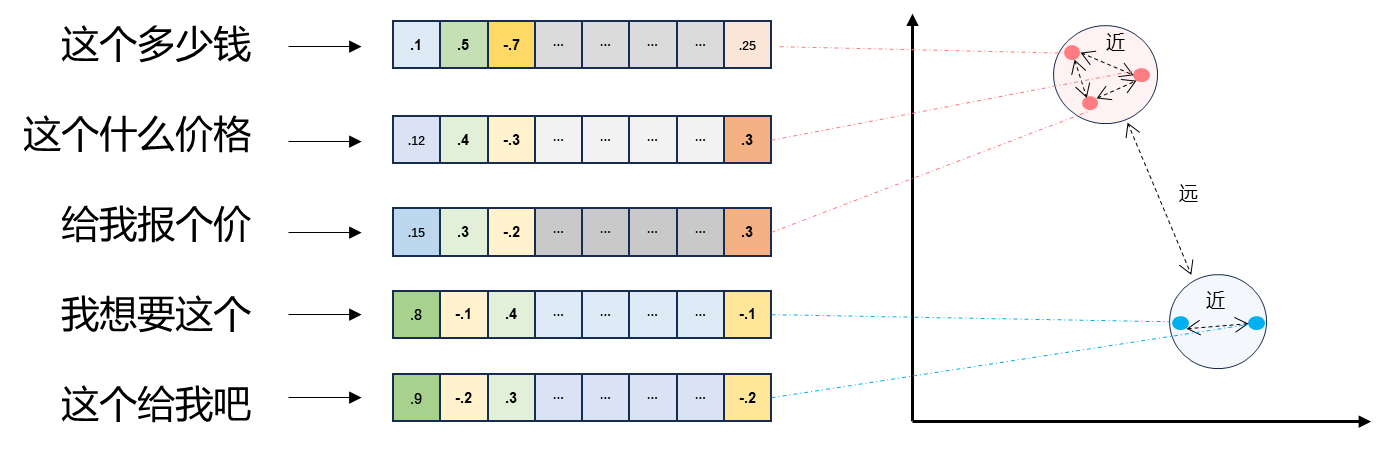
  1. 将文本转成一组浮点数:每个下标 ,对应一个维度
  2. 整个数组对应一个 维空间的一个点,即文本向量又叫 Embeddings
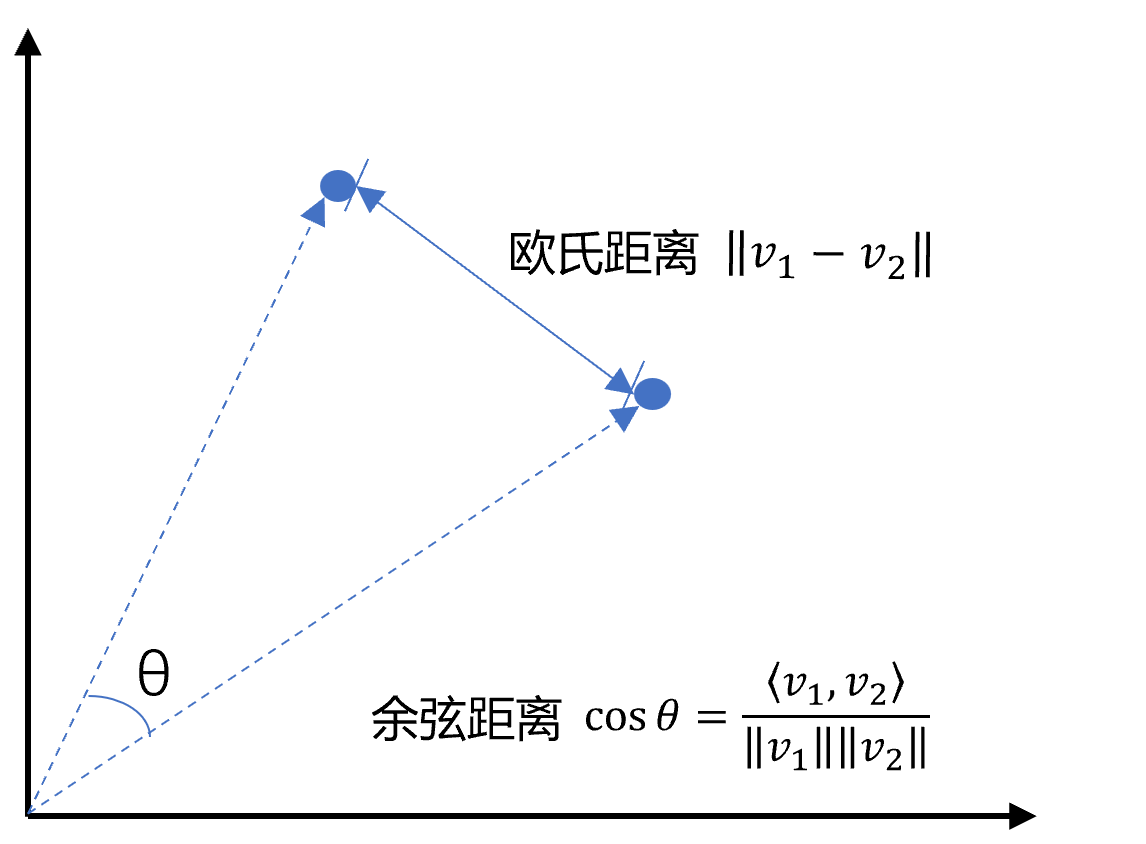
  3. 向量之间可以计算距离,距离远近对应语义相似度大小

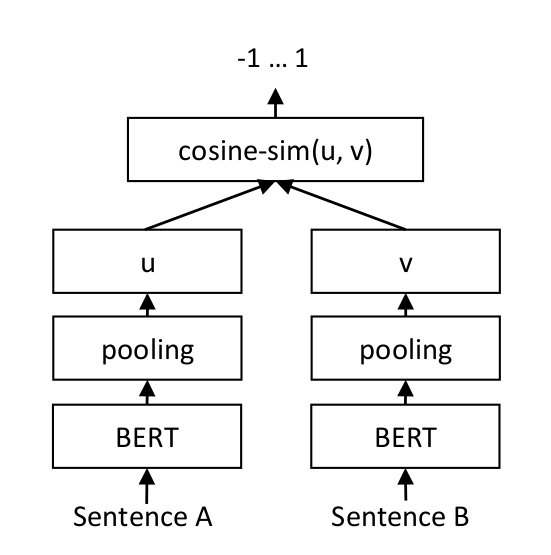
3.1.1、文本向量是怎么得到的 [1]

  1. 构建相关(正立)与不相关(负例)的句子对儿样本
  2. 训练双塔式模型,让正例间的距离小,负例间的距离大

例如:

3.2、向量间的相似度计算

1
2
3
4
5
6
7
8
9
10
11
12
13
14
15
16
17
18
19
20
21
22
23
24
25
26
27
28
29
30
31
32
33
34
35
36
37
38
39
40
41
42
43
44
45
46
47
import numpy as np
from numpy import dot
from numpy.linalg import norm
import dashscope
import os

def cos_sim(a, b):
'''余弦距离 -- 越大越相似'''
return dot(a, b)/(norm(a)*norm(b))


def l2(a, b):
'''欧式距离 -- 越小越相似'''
x = np.asarray(a)-np.asarray(b)
return norm(x)

#通义前文embeding模型
def get_embedings(texts):
resp = dashscope.TextEmbedding.call(
model=dashscope.TextEmbedding.Models.text_embedding_v2,
input=texts)
return [x.embedding for x in resp]


# query = "国际争端"
query = "global conflicts"

documents = [
"联合国就苏丹达尔富尔地区大规模暴力事件发出警告",
"土耳其、芬兰、瑞典与北约代表将继续就瑞典“入约”问题进行谈判",
"日本岐阜市陆上自卫队射击场内发生枪击事件 3人受伤",
"国家游泳中心(水立方):恢复游泳、嬉水乐园等水上项目运营",
"我国首次在空间站开展舱外辐射生物学暴露实验",
]

query_vec = get_embeddings([query])[0]
doc_vecs = get_embeddings(documents)

print("Cosine distance:")
print(cos_sim(query_vec, query_vec))
for vec in doc_vecs:
print(cos_sim(query_vec, vec))

print("\nEuclidean distance:")
print(l2(query_vec, query_vec))
for vec in doc_vecs:
print(l2(query_vec, vec))

输出

1
2
3
4
5
6
7
8
9
10
11
12
13
14
15
Cosine distance:
1.0
0.7622749944010915
0.7563038106493584
0.7426665802579038
0.7079273699608006
0.7254355321045072

Euclidean distance:
0.0
0.6895288502682277
0.6981349637998769
0.7174028746492277
0.7642939833636829
0.7410323668625171

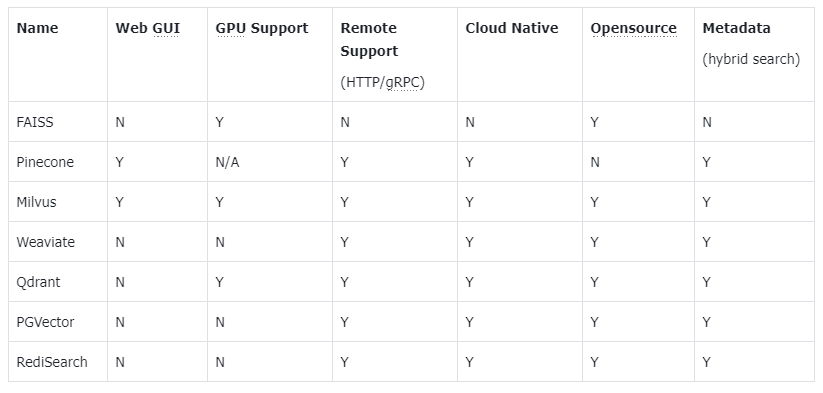
3.3、向量数据库

3.3.1 主流向量数据库

  • FAISS: Meta 开源的向量检索引擎
  • Pinecone: 商用向量数据库,只有云服务
  • Milvus: 开源向量数据库,同时有云服务
  • Weaviate: 开源向量数据库,同时有云服务
  • Qdrant: 开源向量数据库,同时有云服务
  • PGVector: Postgres 的开源向量检索引擎
  • RediSearch: Redis 的开源向量检索引擎
  • ElasticSearch: 也支持向量检索

3.3.2 向量数据库检索

安装依赖

1
2
pip install chromadb
pip install pysqlite3

实现检索

1
2
3
4
5
6
7
8
9
10
11
12
13
14
15
16
17
18
19
20
21
22
23
24
25
26
27
28
29
30
31
32
33
34
35
36
37
38
39
40
41
42
__import__('pysqlite3')
import sys
import chromadb
from chromadb.config import Settings

sys.modules['sqlite3'] = sys.modules.pop('pysqlite3')

# 为了演示方便,只取两页
paragraphs = extract_text_from_pdf(
"llama2.pdf",
page_numbers=[2, 3],
min_line_length=10
)


class MyVectorDBConnector:
def __init__(self, collection_name, embedding_fn):
chroma_client = chromadb.Client(Settings(allow_reset=True))

# 为了演示,实际不需要每次 reset()
chroma_client.reset()

# 创建一个 collection
self.collection = chroma_client.get_or_create_collection(
name=collection_name)
self.embedding_fn = embedding_fn

def add_documents(self, documents):
'''向 collection 中添加文档与向量'''
self.collection.add(
embeddings=self.embedding_fn(documents), # 每个文档的向量
documents=documents, # 文档的原文
ids=[f"id{i}" for i in range(len(documents))] # 每个文档的 id
)

def search(self, query, top_n):
'''检索向量数据库'''
results = self.collection.query(
query_embeddings=self.embedding_fn([query]),
n_results=top_n
)
return results

添加文档并检索

1
2
3
4
5
6
7
8
9
10
# 创建一个向量数据库对象
vector_db = MyVectorDBConnector("demo", get_embeddings)
# 向向量数据库中添加文档
vector_db.add_documents(paragraphs)

user_query = "Llama 2有多少参数"
results = vector_db.search(user_query, 2)

for para in results['documents'][0]:
print(para+"\n")
1
2
3
1. Llama 2, an updated version of Llama 1, trained on a new mix of publicly available data. We also increased the size of the pretraining corpus by 40%, doubled the context length of the model, and adopted grouped-query attention (Ainslie et al., 2023). We are releasing variants of Llama 2 with 7B, 13B, and 70B parameters. We have also trained 34B variants, which we report on in this paper but are not releasing.§

In this work, we develop and release Llama 2, a family of pretrained and fine-tuned LLMs, Llama 2 and Llama 2-Chat, at scales up to 70B parameters. On the series of helpfulness and safety benchmarks we tested, Llama 2-Chat models generally perform better than existing open-source models. They also appear to be on par with some of the closed-source models, at least on the human evaluations we performed (see Figures 1 and 3). We have taken measures to increase the safety of these models, using safety-specific data annotation and tuning, as well as conducting red-teaming and employing iterative evaluations. Additionally, this paper contributes a thorough description of our fine-tuning methodology and approach to improving LLM safety. We hope that this openness will enable the community to reproduce fine-tuned LLMs and continue to improve the safety of those models, paving the way for more responsible development of LLMs. We also share novel observations we made during the development of Llama 2 and Llama 2-Chat, such as the emergence of tool usage and temporal organization of knowledge.

3.4、基于向量检索的 RAG

检索

1
2
3
4
5
6
7
8
9
10
11
12
13
14
15
16
17
18
19
20
21
22
23
24
25
26
27
28
29
class RAG_Bot:
def __init__(self, vector_db, llm_api, n_results=2):
self.vector_db = vector_db
self.llm_api = llm_api
self.n_results = n_results

def chat(self, user_query):
# 1. 检索
search_results = self.vector_db.search(user_query, self.n_results)

# 2. 构建 Prompt
prompt = build_prompt(
prompt_template, info=search_results['documents'][0], query=user_query)

# 3. 调用 LLM
response = self.llm_api(prompt)
return response

# 创建一个RAG机器人
bot = RAG_Bot(
vector_db,
llm_api=get_completion
)

user_query = "llama 2有对话版吗?"

response = bot.chat(user_query)

print(response)

输出

1
是的,Llama 2有一个针对对话用例优化的版本,称为Llama 2-Chat。

3.5、OpenAI 新发布的两个 Embedding 模型

2024 年 1 月 25 日,OpenAI 新发布了两个 Embedding 模型

  • text-embedding-3-large
  • text-embedding-3-small

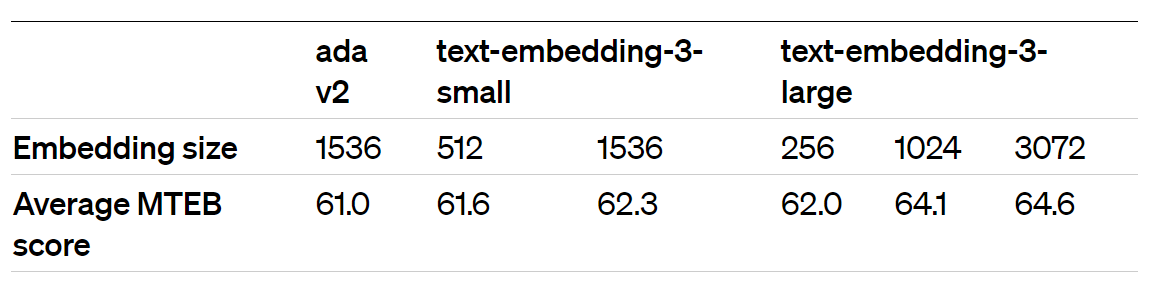
其最大特点是,支持自定义的缩短向量维度,从而在几乎不影响最终效果的情况下降低向量检索与相似度计算的复杂度。

通俗的说:越大越准、越小越快。 官方公布的评测结果:

注:MTEB 是一个大规模多任务的 Embedding 模型公开评测集

1
2
3
4
5
6
7
8
9
10
11
12
13
14
15
16
17
18
19
20
21
22
23
24
25
26
27
28
29
30
31
32
33
34
35
36
37
38
39
40
41
42
43
44
45
46
from openai import OpenAI
# 加载环境变量
from dotenv import load_dotenv, find_dotenv
_ = load_dotenv(find_dotenv()) # 读取本地 .env 文件,里面定义了 OPENAI_API_KEY

client = OpenAI()

def get_embeddings(texts, model="text-embedding-ada-002", dimensions=None):
'''封装 OpenAI 的 Embedding 模型接口'''
if model == "text-embedding-ada-002":
dimensions = None
if dimensions:
data = client.embeddings.create(
input=texts, model=model, dimensions=dimensions).data
else:
data = client.embeddings.create(input=texts, model=model).data
return [x.embedding for x in data]

model = "text-embedding-3-large"
dimensions = 128

query = "国际争端"

# 且能支持跨语言
# query = "global conflicts"

documents = [
"联合国就苏丹达尔富尔地区大规模暴力事件发出警告",
"土耳其、芬兰、瑞典与北约代表将继续就瑞典“入约”问题进行谈判",
"日本岐阜市陆上自卫队射击场内发生枪击事件 3人受伤",
"国家游泳中心(水立方):恢复游泳、嬉水乐园等水上项目运营",
"我国首次在空间站开展舱外辐射生物学暴露实验",
]

query_vec = get_embeddings([query], model=model, dimensions=dimensions)[0]
doc_vecs = get_embeddings(documents, model=model, dimensions=dimensions)

print("Dim: {}".format(len(query_vec)))

print("Cosine distance:")
for vec in doc_vecs:
print(cos_sim(query_vec, vec))

print("\nEuclidean distance:")
for vec in doc_vecs:
print(l2(query_vec, vec))
1
2
3
4
5
6
7
8
9
10
11
12
13
14
Dim: 128
Cosine distance:
0.28595529341628745
0.4193233011210104
0.21555240850631385
0.13925410790653184
0.17101392063341334

Euclidean distance:
1.1950269560302964
1.0776610725305211
1.2525554845176528
1.3120563550406072
1.2876226583438741

四、RAG系统进阶

4.1、文本分割的粒度

缺陷

  1. 粒度太大可能导致检索不精准,粒度太小可能导致信息不全面
  2. 问题的答案可能跨越两个片段
1
2
3
4
5
6
7
8
9
10
11
12
13
14
15
16
17
18
19
20
# 创建一个向量数据库对象
vector_db = MyVectorDBConnector("demo_text_split", get_embeddings)
# 向向量数据库中添加文档
vector_db.add_documents(paragraphs)

# 创建一个RAG机器人
bot = RAG_Bot(
vector_db,
llm_api=get_completion
)

user_query = "llama 2可以商用吗?"
# user_query="llama 2 chat有多少参数"
search_results = vector_db.search(user_query, 2)

for doc in search_results['documents'][0]:
print(doc+"\n")

print("====回复====")
bot.chat(user_query)
1
2
3
4
5
6
 We believe that the open release of LLMs, when done safely, will be a net benefit to society. Like all LLMs, Llama 2 is a new technology that carries potential risks with use (Bender et al., 2021b; Weidinger et al., 2021; Solaiman et al., 2023). Testing conducted to date has been in English and has notand could not — cover all scenarios. Therefore, before deploying any applications of Llama 2-Chat, developers should perform safety testing and tuning tailored to their specific applications of the model. We provide a responsible use guide¶ and code examples‖ to facilitate the safe deployment of Llama 2 and Llama 2-Chat. More details of our responsible release strategy can be found in Section 5.3.

In this work, we develop and release Llama 2, a family of pretrained and fine-tuned LLMs, Llama 2 and Llama 2-Chat, at scales up to 70B parameters. On the series of helpfulness and safety benchmarks we tested, Llama 2-Chat models generally perform better than existing open-source models. They also appear to be on par with some of the closed-source models, at least on the human evaluations we performed (see Figures 1 and 3). We have taken measures to increase the safety of these models, using safety-specific data annotation and tuning, as well as conducting red-teaming and employing iterative evaluations. Additionally, this paper contributes a thorough description of our fine-tuning methodology and approach to improving LLM safety. We hope that this openness will enable the community to reproduce fine-tuned LLMs and continue to improve the safety of those models, paving the way for more responsible development of LLMs. We also share novel observations we made during the development of Llama 2 and Llama 2-Chat, such as the emergence of tool usage and temporal organization of knowledge.

====回复====
'在部署任何Llama 2-Chat的应用之前,开发者应该进行安全测试和调整,以适应他们的特定模型应用。这表明Llama 2是可以商用的,但前提是要确保安全性和适用性,且建议进行相应的测试和措施来增加安全性。'

改进: 按一定粒度,部分重叠式的切割文本,使上下文更完整

1
2
3
4
5
6
7
8
9
10
11
12
13
14
15
16
17
18
19
20
21
22
23
24
25
26
27
from nltk.tokenize import sent_tokenize
import json


def split_text(paragraphs, chunk_size=300, overlap_size=100):
'''按指定 chunk_size 和 overlap_size 交叠割文本'''
sentences = [s.strip() for p in paragraphs for s in sent_tokenize(p)]
chunks = []
i = 0
while i < len(sentences):
chunk = sentences[i]
overlap = ''
prev_len = 0
prev = i - 1
# 向前计算重叠部分
while prev >= 0 and len(sentences[prev])+len(overlap) <= overlap_size:
overlap = sentences[prev] + ' ' + overlap
prev -= 1
chunk = overlap+chunk
next = i + 1
# 向后计算当前chunk
while next < len(sentences) and len(sentences[next])+len(chunk) <= chunk_size:
chunk = chunk + ' ' + sentences[next]
next += 1
chunks.append(chunk)
i = next
return chunks

检索

1
2
3
4
5
6
7
8
9
10
11
12
13
14
15
16
17
18
19
20
21
22
23
chunks = split_text(paragraphs, 300, 100)

# 创建一个向量数据库对象
vector_db = MyVectorDBConnector("demo_text_split", get_embeddings)
# 向向量数据库中添加文档
vector_db.add_documents(chunks)
# 创建一个RAG机器人
bot = RAG_Bot(
vector_db,
llm_api=get_completion
)


user_query = "llama 2可以商用吗?"
# user_query="llama 2 chat有多少参数"

search_results = vector_db.search(user_query, 2)
for doc in search_results['documents'][0]:
print(doc+"\n")

response = bot.chat(user_query)
print("====回复====")
print(response)

输出

1
2
3
4
5
6
2. Llama 2-Chat, a fine-tuned version of Llama 2 that is optimized for dialogue use cases. We release variants of this model with 7B, 13B, and 70B parameters as well. We believe that the open release of LLMs, when done safely, will be a net benefit to society.

We are releasing the following models to the general public for research and commercial use‡: 1. Llama 2, an updated version of Llama 1, trained on a new mix of publicly available data.

====回复====
Llama 2可以供研究和商业使用。

4.2、检索后排序

问题: 有时,最合适的答案不一定排在检索的最前面

1
2
3
4
5
6
7
8
9
user_query = "how safe is llama 2"
search_results = vector_db.search(user_query, 5)

for doc in search_results['documents'][0]:
print(doc+"\n")

response = bot.chat(user_query)
print("====回复====")
print(response)
1
2
3
4
5
6
7
8
9
10
11
12
We believe that the open release of LLMs, when done safely, will be a net benefit to society. Like all LLMs, Llama 2 is a new technology that carries potential risks with use (Bender et al., 2021b; Weidinger et al., 2021; Solaiman et al., 2023).

We also share novel observations we made during the development of Llama 2 and Llama 2-Chat, such as the emergence of tool usage and temporal organization of knowledge. Figure 3: Safety human evaluation results for Llama 2-Chat compared to other open-source and closed source models.

In this work, we develop and release Llama 2, a family of pretrained and fine-tuned LLMs, Llama 2 and Llama 2-Chat, at scales up to 70B parameters. On the series of helpfulness and safety benchmarks we tested, Llama 2-Chat models generally perform better than existing open-source models.

Additionally, these safety evaluations are performed using content standards that are likely to be biased towards the Llama 2-Chat models. We are releasing the following models to the general public for research and commercial use‡: 1.
We provide a responsible use guide¶ and code examples‖ to facilitate the safe deployment of Llama 2 and Llama 2-Chat. More details of our responsible release strategy can be found in Section 5.3.

====回复====
Llama 2的安全性在人类评估中有所体现,但所有LLMs,包括Llama 2,都存在潜在风险(Bender et al., 2021b; Weidinger et al., 2021; Solaiman et al., 2023)。具体到Llama 2-Chat,图3展示了与开源和闭源模型相比的安全性结果。然而,没有提供详细的比较或分数,所以我无法直接告诉你Llama 2的整体安全等级。建议参考相关研究或最新的人类评估报告来了解其安全性情况。

方案:

  1. 检索时多召回一部分文本
  2. 通过一个排序模型对 query 和 document 重新打分排序

机制如下

RAG ReRanker实现

1
2
3
4
5
6
7
8
9
10
11
12
13
from sentence_transformers import CrossEncoder

model = CrossEncoder('cross-encoder/ms-marco-MiniLM-L-6-v2', max_length=512) #huggingface下载对应模型

user_query = "how safe is llama 2"

scores = model.predict([(user_query, doc)
for doc in search_results['documents'][0]])
# 按得分排序
sorted_list = sorted(
zip(scores, search_results['documents'][0]), key=lambda x: x[0], reverse=True)
for score, doc in sorted_list:
print(f"{score}\t{doc}\n")
1
2
3
4
5
6
7
8
9
6.613733291625977	We believe that the open release of LLMs, when done safely, will be a net benefit to society. Like all LLMs, Llama 2 is a new technology that carries potential risks with use (Bender et al., 2021b; Weidinger et al., 2021; Solaiman et al., 2023).

5.310719013214111 In this work, we develop and release Llama 2, a family of pretrained and fine-tuned LLMs, Llama 2 and Llama 2-Chat, at scales up to 70B parameters. On the series of helpfulness and safety benchmarks we tested, Llama 2-Chat models generally perform better than existing open-source models.

4.709953308105469 We provide a responsible use guide¶ and code examples‖ to facilitate the safe deployment of Llama 2 and Llama 2-Chat. More details of our responsible release strategy can be found in Section 5.3.

4.5439653396606445 We also share novel observations we made during the development of Llama 2 and Llama 2-Chat, such as the emergence of tool usage and temporal organization of knowledge. Figure 3: Safety human evaluation results for Llama 2-Chat compared to other open-source and closed source models.

4.03388786315918 Additionally, these safety evaluations are performed using content standards that are likely to be biased towards the Llama 2-Chat models. We are releasing the following models to the general public for research and commercial use‡: 1.
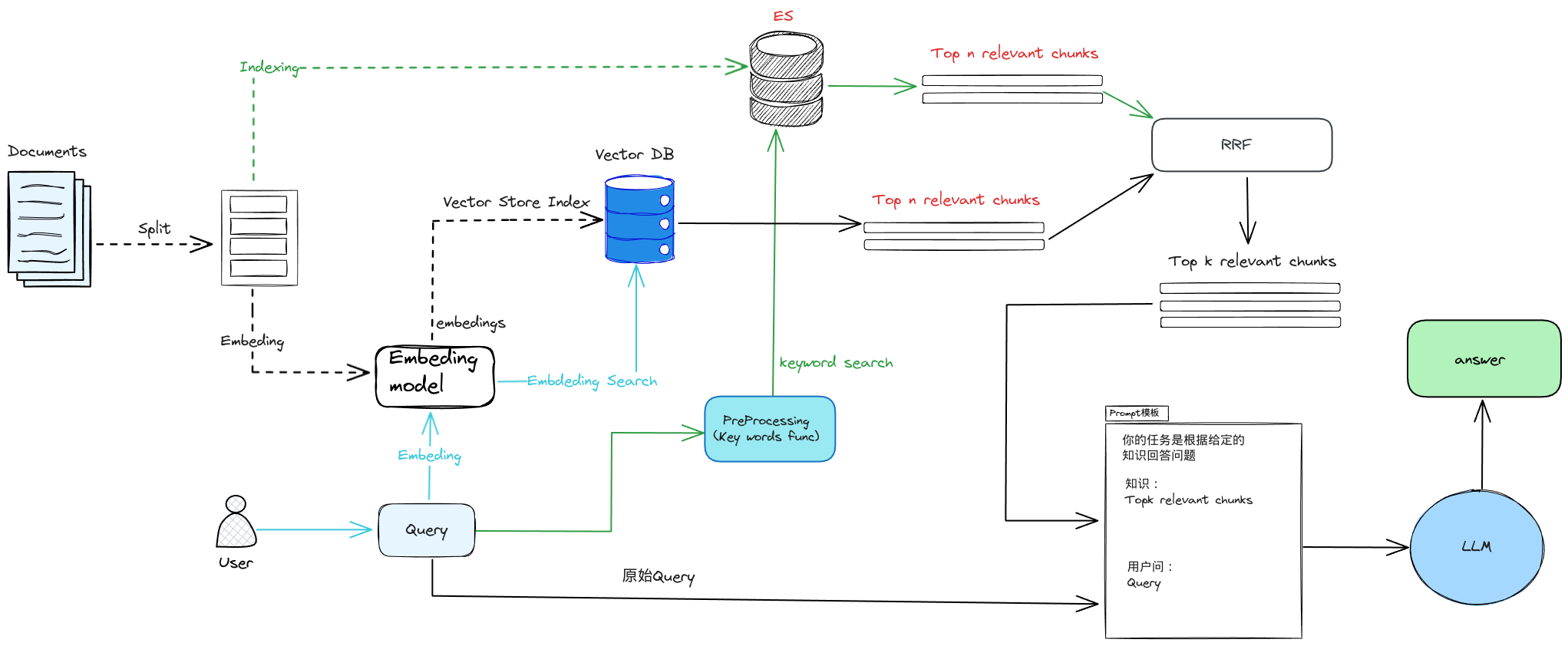
实际生产中,传统的关键字检索(稀疏表示)与向量检索(稠密表示)各有优劣。

举个具体例子,比如文档中包含很长的专有名词,关键字检索往往更精准而向量检索容易引入概念混淆。

1
2
3
4
5
6
7
8
9
10
11
12
13
14
15
16
17
# 背景说明:在医学中“小细胞肺癌”和“非小细胞肺癌”是两种不同的癌症

query = "非小细胞肺癌的患者"

documents = [
"李某患有肺癌,癌细胞已转移",
"刘某肺癌I期",
"张某经诊断为非小细胞肺癌III期",
"小细胞肺癌是肺癌的一种"
]

query_vec = get_embeddings([query])[0]
doc_vecs = get_embeddings(documents)

print("Cosine distance:")
for vec in doc_vecs:
print(cos_sim(query_vec, vec))

输出

1
2
3
4
5
Cosine distance:
0.9104978086098472
0.8897648918974229
0.9040803406710735
0.9132102982983261

所以,有时候我们需要结合不同的检索算法,来达到比单一检索算法更优的效果。这就是混合检索

混合检索的核心是,综合文档在不同检索算法下的排序名次(rank),为其生成最终排序。

一个最常用的算法叫 Reciprocal Rank Fusion(RRF) [2]

其中 表示所有使用的检索算法的集合, 表示使用算法 检索时,文档 的排序, 是个常数。

很多向量数据库都支持混合检索,比如 WeaviatePinecone 等。也可以根据上述原理自己实现。

RRF机制

4.3.1、写个简单的例子

1. 基于关键字检索的排序
1
2
3
4
5
6
7
8
9
10
11
12
13
14
15
16
17
18
19
20
21
22
23
24
25
26
27
28
29
30
31
32
33
34
35
36
37
38
39
40
41
42
43
44
import time


class MyEsConnector:
def __init__(self, es_client, index_name, keyword_fn):
self.es_client = es_client
self.index_name = index_name
self.keyword_fn = keyword_fn

def add_documents(self, documents):
'''文档灌库'''
if self.es_client.indices.exists(index=self.index_name):
self.es_client.indices.delete(index=self.index_name)
self.es_client.indices.create(index=self.index_name)
actions = [
{
"_index": self.index_name,
"_source": {
"keywords": self.keyword_fn(doc),
"text": doc,
"id": f"doc_{i}"
}
}
for i, doc in enumerate(documents)
]
helpers.bulk(self.es_client, actions)
time.sleep(1)

def search(self, query_string, top_n=3):
'''检索'''
search_query = {
"match": {
"keywords": self.keyword_fn(query_string)
}
}
res = self.es_client.search(
index=self.index_name, query=search_query, size=top_n)
return {
hit["_source"]["id"]: {
"text": hit["_source"]["text"],
"rank": i,
}
for i, hit in enumerate(res["hits"]["hits"])
}

中文处理

1
2
3
4
5
6
7
8
9
10
11
12
13
14
15
16
17
18
19
20
21
22
23
24
25
26
27
28
29
30
31
32
33
34
35
36
37
38
39
40
import re
import jieba
import nltk
from nltk.corpus import stopwords

nltk.download('stopwords')

def to_keywords(input_string):
"""将句子转成检索关键词序列"""
# 按搜索引擎模式分词
word_tokens = jieba.cut_for_search(input_string)
# 加载停用词表
stop_words = set(stopwords.words('chinese'))
# 去除停用词
filtered_sentence = [w for w in word_tokens if not w in stop_words]
return ' '.join(filtered_sentence)

def sent_tokenize(input_string):
"""按标点断句"""
# 按标点切分
sentences = re.split(r'(?<=[。!?;?!])', input_string)
# 去掉空字符串
return [sentence for sentence in sentences if sentence.strip()]


es = Elasticsearch(
hosts=['http://ip:port'], # 服务地址与端口
http_auth=("es_user", "es_passwd"), # 用户名,密码
)

# 创建 ES 连接器
es_connector = MyEsConnector(es, "demo_es_rrf", to_keywords)

# 文档灌库
es_connector.add_documents(documents)

# 关键字检索
keyword_search_results = es_connector.search(query, 3)

print(keyword_search_results)

输出

1
{'doc_2': {'text': '张某经诊断为非小细胞肺癌III期', 'rank': 0}, 'doc_0': {'text': '李某患有肺癌,癌细胞已转移', 'rank': 1}, 'doc_3': {'text': '小细胞肺癌是肺癌的一种', 'rank': 2}}
2. 基于向量检索的排序
1
2
3
4
5
6
7
8
9
10
11
12
13
14
15
16
17
18
# 创建向量数据库连接器
vecdb_connector = MyVectorDBConnector("demo_vec_rrf", get_embeddings)

# 文档灌库
vecdb_connector.add_documents(documents)

# 向量检索
vector_search_results = {
"doc_"+str(documents.index(doc)): {
"text": doc,
"rank": i
}
for i, doc in enumerate(
vecdb_connector.search(query, 3)["documents"][0]
)
} # 把结果转成跟上面关键字检索结果一样的格式

print(vector_search_results)

输出

1
{'doc_3': {'text': '小细胞肺癌是肺癌的一种', 'rank': 0}, 'doc_0': {'text': '李某患有肺癌,癌细胞已转移', 'rank': 1}, 'doc_2': {'text': '张某经诊断为非小细胞肺癌III期', 'rank': 2}}
3. 基于 RRF 的融合排序
1
2
3
4
5
6
7
8
9
10
11
12
13
14
15
16
17
18
19
import json
def rrf(ranks, k=1):
ret = {}
# 遍历每次的排序结果
for rank in ranks:
# 遍历排序中每个元素
for id, val in rank.items():
if id not in ret:
ret[id] = {"score": 0, "text": val["text"]}
# 计算 RRF 得分
ret[id]["score"] += 1.0/(k+val["rank"])
# 按 RRF 得分排序,并返回
return dict(sorted(ret.items(), key=lambda item: item[1]["score"], reverse=True))


# 融合两次检索的排序结果
reranked = rrf([keyword_search_results, vector_search_results])

print(json.dumps(reranked, indent=4, ensure_ascii=False))

输出

1
2
3
4
5
6
7
8
9
10
11
12
13
14
{
"doc_2": {
"score": 1.3333333333333333,
"text": "张某经诊断为非小细胞肺癌III期"
},
"doc_3": {
"score": 1.3333333333333333,
"text": "小细胞肺癌是肺癌的一种"
},
"doc_0": {
"score": 1.0,
"text": "李某患有肺癌,癌细胞已转移"
}
}

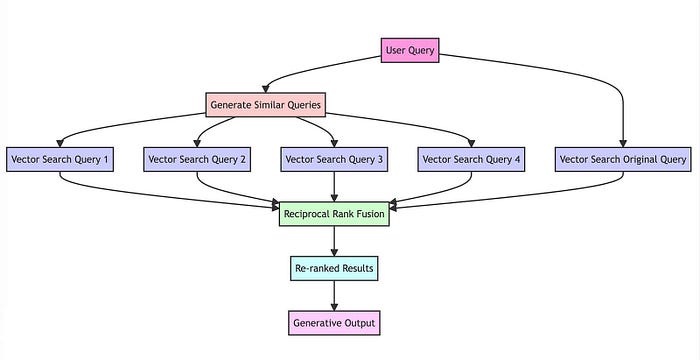
4.4 RAG-Fusion

RAG-Fusion 就是利用了 RRF 的原理来提升检索的准确性。

原始项目(一段非常简短的演示代码):https://github.com/Raudaschl/rag-fusion

五、向量模型的本地部署

moka-ai/m3e-base 模型,需要去huggingface下载

1
2
3
4
5
6
7
8
9
10
11
12
13
14
15
16
17
18
19
20
21
22
23
24
25
26
27
28
29
from sentence_transformers import SentenceTransformer

# model_name = 'BAAI/bge-large-zh-v1.5' #中文
model_name = 'moka-ai/m3e-base' # 中英双语,但效果一般

model = SentenceTransformer(model_name)

# query = "国际争端"
query = "global conflicts"

documents = [
"联合国就苏丹达尔富尔地区大规模暴力事件发出警告",
"土耳其、芬兰、瑞典与北约代表将继续就瑞典“入约”问题进行谈判",
"日本岐阜市陆上自卫队射击场内发生枪击事件 3人受伤",
"国家游泳中心(水立方):恢复游泳、嬉水乐园等水上项目运营",
"我国首次在空间站开展舱外辐射生物学暴露实验",
]

query_vec = model.encode(query)

doc_vecs = [
model.encode(doc)
for doc in documents
]

print("Cosine distance:") # 越大越相似
# print(cos_sim(query_vec, query_vec))
for vec in doc_vecs:
print(cos_sim(query_vec, vec))

输出

1
2
3
4
5
6
Cosine distance:
0.69588137
0.6573522
0.66534257
0.6371887
0.6942898

总结

RAG 的流程


RAG
https://mztchaoqun.com.cn/posts/D13_RAG/
作者
mztchaoqun
发布于
2024年2月26日
许可协议