Function Calling

一、Function Calling

1.1 Function Calling是什么

Function calling是可以让我们用自己的函数当作调用chatgpt的参数,在函数中我们可以做任何事情,例如获取网络上的数据,查询自己的数据库等。

1.2 为什么要有 Function Calling

ChatGPT是一个通用的大语言模型,当面对某些个性化的用户需求,比如“当前的天气情况”“某数据库的查询”“未来15天的天气预报”等,对于这些问题的解答,ChatGPT是无法回答的。其实Function Calling就是为了解决上述特定需求而产生的,当通用大语言模型完成上述的问题时,可以考虑借助外部的接口和服务,将它们看作大语言模型的基础接口使用就可以了。这样当用户需要询问当前天气时,ChatGPT自行考虑是否需要调用外部接口就可以了。

1.3 Function Calling 的机制

Function Calling 技术可以把大模型和业务系统连接,实现更丰富的功能。
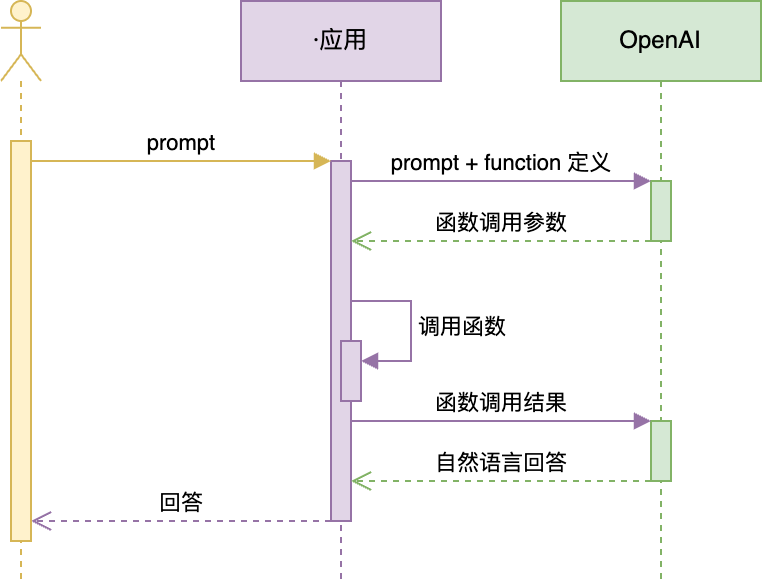
Function Calling 完整的官方接口文档:https://platform.openai.com/docs/guides/function-calling

二、Function Calling使用

以下代码使用阿里通义千问大模型与使用ChatGPT差不多,文档:https://help.aliyun.com/zh/dashscope/developer-reference/api-details?spm=a2c4g.11186623.0.0.1b3e5f84Jrc9KM

示例 1:调用本地函数

需求:实现一个回答问题的 AI。题目中如果有加法,必须能精确计算。

1
2
3
4
5
6
7
8
9
10
11
12
13
14
15
16
17
18
19
20
21
22
23
24
25
26
27
28
29
30
31
32
33
34
35
36
37
38
39
40
41
42
43
44
45
46
47
48
49
50
51
52
53
54
55
56
57
58
59
60
61
62
63
64
65
66
67
68
69
70
71
72
73
74
75
76
77
78
79
80
81
82
83
84
85
86
87
88
89
90
91
92
93
94
95
96
97
98
import json
from dashscope import Generation
from datetime import datetime
from math import *

def print_json(data):
"""
打印参数。如果参数是有结构的(如字典或列表),则以格式化的 JSON 形式打印;
否则,直接打印该值。
"""
if (isinstance(data, (list))):
for item in data:
print_json(item)
elif (isinstance(data, (dict))):
print(json.dumps(
data,
indent=4,
ensure_ascii=False
))
else:
print(data)

def get_completion(messages, model="qwen-max"):
response = Generation.call(
model=model,
messages=messages,
temperature=0.7,
tools=[{ # 用 JSON 描述函数。可以定义多个。由大模型决定调用谁。也可能都不调用
"type": "function",
"function": {
"name": "sum",
"description": "加法器,计算一组数的和",
"parameters": {
"type": "object",
"properties": {
"numbers": {
"type": "array",
"items": {
"type": "number"
}
}
}
}
}
}],
seed=random.randint(1, 10000), # 设置随机数种子seed,如果没有设置,则随机数种子默认为1234
result_format='message' # 将输出设置为message形式
)
return response.output.choices[0].message


prompt = "Tell me the sum of 1, 2, 3, 4, 5, 6, 7, 8, 9, 10."
#prompt = "桌上有 2 个苹果,四个桃子和 3 本书,一共有几个水果?"
prompt = "1+2+3...+99+100"
#prompt = "1024 乘以 1024 是多少?" # Tools 里没有定义乘法,会怎样?
#prompt = "太阳从哪边升起?" # 不需要算加法,会怎样?

messages = [
{"role": "system", "content": "你是一个数学家"},
{"role": "user", "content": prompt}
]
response = get_completion(messages)

# 把大模型的回复加入到对话历史中。必须有
messages.append(response)

print(response)
print("=====Qwen 第一次回复=====")
print_json(response)

# 如果返回的是函数调用结果,则打印出来
try:
if (response.tool_calls is not None):
# 是否要调用 sum
tool_call = response.tool_calls[0]
print(tool_call)
if (tool_call['function']['name'] == "sum"):
# 调用 sum
args = json.loads(tool_call['function']['arguments'])
result = sum(args["numbers"])
print("=====函数返回结果=====")
print(result)

# 把函数调用结果加入到对话历史中
messages.append(
{
"tool_call_id": tool_call['id'], # 用于标识函数调用的 ID
"role": "tool",
"name": "sum",
"content": str(result) # 数值 result 必须转成字符串
}
)

# 再次调用大模型
print("=====最终 Qwen 回复=====")
print(get_completion(messages).content)
except:
pass
1
2
3
4
5
6
7
8
9
10
11
12
13
14
15
16
17
18
19
20
21
{"role": "assistant", "content": "", "tool_calls": [{"function": {"name": "sum", "arguments": "{\"numbers\": [1, 2, 3, 4, 5, 6, 7, 8, 9, 10, 11, 12, 13, 14, 15, 16, 17, 18, 19, 20, 21, 22, 23, 24, 25, 26, 27, 28, 29, 30, 31, 32, 33, 34, 35, 36, 37, 38, 39, 40, 41, 42, 43, 44, 45, 46, 47, 48, 49, 50, 51, 52, 53, 54, 55, 56, 57, 58, 59, 60, 61, 62, 63, 64, 65, 66, 67, 68, 69, 70, 71, 72, 73, 74, 75, 76, 77, 78, 79, 80, 81, 82, 83, 84, 85, 86, 87, 88, 89, 90, 91, 92, 93, 94, 95, 96, 97, 98, 99, 100]}"}, "id": "", "type": "function"}]}
=====Qwen 第一次回复=====
{
"role": "assistant",
"content": "",
"tool_calls": [
{
"function": {
"name": "sum",
"arguments": "{\"numbers\": [1, 2, 3, 4, 5, 6, 7, 8, 9, 10, 11, 12, 13, 14, 15, 16, 17, 18, 19, 20, 21, 22, 23, 24, 25, 26, 27, 28, 29, 30, 31, 32, 33, 34, 35, 36, 37, 38, 39, 40, 41, 42, 43, 44, 45, 46, 47, 48, 49, 50, 51, 52, 53, 54, 55, 56, 57, 58, 59, 60, 61, 62, 63, 64, 65, 66, 67, 68, 69, 70, 71, 72, 73, 74, 75, 76, 77, 78, 79, 80, 81, 82, 83, 84, 85, 86, 87, 88, 89, 90, 91, 92, 93, 94, 95, 96, 97, 98, 99, 100]}"
},
"id": "",
"type": "function"
}
]
}
{'function': {'name': 'sum', 'arguments': '{"numbers": [1, 2, 3, 4, 5, 6, 7, 8, 9, 10, 11, 12, 13, 14, 15, 16, 17, 18, 19, 20, 21, 22, 23, 24, 25, 26, 27, 28, 29, 30, 31, 32, 33, 34, 35, 36, 37, 38, 39, 40, 41, 42, 43, 44, 45, 46, 47, 48, 49, 50, 51, 52, 53, 54, 55, 56, 57, 58, 59, 60, 61, 62, 63, 64, 65, 66, 67, 68, 69, 70, 71, 72, 73, 74, 75, 76, 77, 78, 79, 80, 81, 82, 83, 84, 85, 86, 87, 88, 89, 90, 91, 92, 93, 94, 95, 96, 97, 98, 99, 100]}'}, 'id': '', 'type': 'function'}
=====函数返回结果=====
5050
=====最终 Qwen 回复=====
The sum of the numbers from 1 to 100 is 5,050.

示例 2:多 Function 调用

需求:查询某个地点附近的酒店、餐厅、景点等信息。即,查询某个 POI 附近的 POI。

1
2
3
4
5
6
7
8
9
10
11
12
13
14
15
16
17
18
19
20
21
22
23
24
25
26
27
28
29
30
31
32
33
34
35
36
37
38
39
40
41
42
43
44
45
46
47
48
49
50
51
52
53
54
55
56
57
58
59
60
61
62
63
64
65
66
67
68
69
70
71
72
73
74
75
76
77
78
79
80
81
82
83
84
85
86
87
88
89
90
91
92
93
94
95
96
97
98
99
100
101
102
103
104
105
106
107
108
109
110
111
112
113
114
115
116
117
118
119
120
121
122
123
124
125
126
127
128
129
130
131
132
133
134
135
136
137
138
139
140
141
142
143
144
145
146
147
148
149
150
151
152
import requests
import json
from dashscope import Generation
from datetime import datetime

def print_json(data):
"""
打印参数。如果参数是有结构的(如字典或列表),则以格式化的 JSON 形式打印;
否则,直接打印该值。
"""
if (isinstance(data, (list))):
for item in data:
print_json(item)
elif (isinstance(data, (dict))):
print(json.dumps(
data,
indent=4,
ensure_ascii=False
))
else:
print(data)

amap_key = "************" #去高德申请调用key

def get_location_coordinate(location, city):
url = f"https://restapi.amap.com/v5/place/text?key={amap_key}&keywords={location}&region={city}"
print(url)
r = requests.get(url)
result = r.json()
if "pois" in result and result["pois"]:
return result["pois"][0]
return None


def search_nearby_pois(longitude, latitude, keyword):
url = f"https://restapi.amap.com/v5/place/around?key={amap_key}&keywords={keyword}&location={longitude},{latitude}"
print(url)
r = requests.get(url)
result = r.json()
ans = ""
if "pois" in result and result["pois"]:
for i in range(min(3, len(result["pois"]))):
name = result["pois"][i]["name"]
address = result["pois"][i]["address"]
distance = result["pois"][i]["distance"]
ans += f"{name}\n{address}\n距离:{distance}米\n\n"
return ans

def get_completion(messages, model="qwen-max"):
response = Generation.call(
model=model,
messages=messages,
temperature=0,
seed=1024, # 随机种子保持不变,temperature 和 prompt 不变的情况下,输出就会不变
tool_choice="auto", # 默认值,由 GPT 自主决定返回 function call 还是返回文字回复。也可以强制要求必须调用指定的函数,详见官方文档
tools=[{
"type": "function",
"function": {
"name": "get_location_coordinate",
"description": "根据POI名称,获得POI的经纬度坐标",
"parameters": {
"type": "object",
"properties": {
"location": {
"type": "string",
"description": "POI名称,必须是中文",
},
"city": {
"type": "string",
"description": "POI所在的城市名,必须是中文",
}
},
"required": ["location", "city"],
}
}
},
{
"type": "function",
"function": {
"name": "search_nearby_pois",
"description": "搜索给定坐标附近的poi",
"parameters": {
"type": "object",
"properties": {
"longitude": {
"type": "string",
"description": "中心点的经度",
},
"latitude": {
"type": "string",
"description": "中心点的纬度",
},
"keyword": {
"type": "string",
"description": "目标poi的关键字",
}
},
"required": ["longitude", "latitude", "keyword"],
}
}
}],
result_format='message' # 将输出设置为message形式
)
return response.output.choices[0].message

prompt = "我到成都玩,给我推成都东站附近的酒店,和天府广场附近的咖啡店" # 一次请求两个调用
#prompt = "我想在北京五道口附近喝咖啡,给我推荐几个"

messages = [
{"role": "system", "content": "你是一个地图通,你可以找到任何地址。"},
{"role": "user", "content": prompt}
]
response = get_completion(messages)
messages.append(response) # 把大模型的回复加入到对话中
print("=====Qwen回复=====")
print_json(response)

try:
while (response.tool_calls is not None):
# 支持一次返回多个函数调用请求,所以要考虑到这种情况
for tool_call in response.tool_calls:
args = json.loads(tool_call['function']['arguments'])
print("函数参数展开:")
print_json(args)

# 函数路由
if (tool_call['function']['name'] == "get_location_coordinate"):
print("Call: get_location_coordinate")
result = get_location_coordinate(**args)
elif (tool_call['function']['name'] == "search_nearby_pois"):
print("Call: search_nearby_pois")
result = search_nearby_pois(**args)

print("=====函数返回=====")
print_json(result)

messages.append({
"tool_call_id": tool_call['id'], # 用于标识函数调用的 ID
"role": "tool",
"name": tool_call['function']['name'] ,
"content": str(result) # 数值result 必须转成字符串
})

response = get_completion(messages)
messages.append(response) # 把大模型的回复加入到对话中
except:
pass

print("=====最终回复=====")
print(response.content)
print("=====对话历史=====")
print_json(messages)
1
2
3
4
5
6
7
8
9
10
11
12
13
14
15
16
17
18
19
20
21
22
23
24
25
26
27
28
29
30
31
32
33
34
35
36
37
38
39
40
41
42
43
44
45
46
47
48
49
50
51
52
53
54
55
56
57
58
59
60
61
62
63
64
65
66
67
68
69
70
71
72
73
74
75
76
77
78
79
80
81
82
83
84
85
86
87
88
89
90
91
92
93
94
95
96
97
98
99
100
101
102
103
104
105
106
107
108
109
110
111
112
113
114
115
116
117
118
119
120
121
122
123
124
125
126
127
128
129
130
131
132
133
134
135
136
137
138
139
140
141
142
143
144
145
146
147
148
149
150
151
152
153
154
155
156
157
158
159
160
161
162
163
164
165
166
167
168
169
170
171
172
173
174
175
176
177
178
179
180
181
182
183
184
185
186
187
188
189
190
191
192
193
194
195
196
197
198
199
200
201
202
203
204
205
206
207
208
209
210
=====Qwen回复=====
{
"role": "assistant",
"content": "",
"tool_calls": [
{
"function": {
"name": "get_location_coordinate",
"arguments": "{\"location\": \"成都东站\", \"city\": \"成都\"}"
},
"id": "",
"type": "function"
}
]
}
函数参数展开:
{
"location": "成都东站",
"city": "成都"
}
Call: get_location_coordinate
https://restapi.amap.com/v5/place/text?key=52288e35e9b404049dd0a68c2bbf4b82&keywords=成都东站&region=成都
=====函数返回=====
{
"parent": "",
"address": "邛崃山路333号(成都东客站地铁站东出口旁)",
"distance": "",
"pcode": "510000",
"adcode": "510108",
"pname": "四川省",
"cityname": "成都市",
"type": "交通设施服务;火车站;火车站",
"typecode": "150200",
"adname": "成华区",
"citycode": "028",
"name": "成都东站",
"location": "104.140947,30.628779",
"id": "B001C80DL2"
}
函数参数展开:
{
"location": "天府广场",
"city": "成都"
}
Call: get_location_coordinate
https://restapi.amap.com/v5/place/text?key=52288e35e9b404049dd0a68c2bbf4b82&keywords=天府广场&region=成都
=====函数返回=====
{
"parent": "",
"address": "人民南路一段86号(天府广场地铁站出入口步行50米)",
"distance": "",
"pcode": "510000",
"adcode": "510105",
"pname": "四川省",
"cityname": "成都市",
"type": "风景名胜;公园广场;城市广场",
"typecode": "110105",
"adname": "青羊区",
"citycode": "028",
"name": "天府广场",
"location": "104.065861,30.657401",
"id": "B001C7WEYU"
}
函数参数展开:
{
"keyword": "酒店",
"latitude": "30.628779",
"longitude": "104.140947"
}
Call: search_nearby_pois
https://restapi.amap.com/v5/place/around?key=52288e35e9b404049dd0a68c2bbf4b82&keywords=酒店&location=104.140947,30.628779
=====函数返回=====
7天优品成都火车东站西广场地铁站店
沱江路25
距离:282

成都龙之梦大酒店
嘉陵江路8
距离:367

嘉得利酒店
沱江路25号(成都火车东站西广场)
距离:327


函数参数展开:
{
"keyword": "咖啡店",
"latitude": "30.657401",
"longitude": "104.065861"
}
Call: search_nearby_pois
https://restapi.amap.com/v5/place/around?key=52288e35e9b404049dd0a68c2bbf4b82&keywords=咖啡店&location=104.065861,30.657401
=====函数返回=====
Costa Coffce(天府广场店)
人民东路天府广场地铁站B1层B003号
距离:13

A咖啡(天府广场店)
人民东路天府广场地铁站F出口B1层
距离:26

星巴克(地铁天府广场店)
天府广场负一楼
距离:31


=====最终回复=====
天府广场附近的咖啡店推荐如下:

1. **Costa Coffee(天府广场店)**,位于人民东路天府广场地铁站B1层B003号,距离天府广场仅约13米。

2. **A咖啡(天府广场店)**,位于人民东路天府广场地铁站F出口B1层,距离天府广场约26米。

3. **星巴克(地铁天府广场店)**,位于天府广场负一楼,距离天府广场约31米。

以上就是您在成都游玩时,成都东站附近可选择的酒店以及天府广场周边的咖啡店信息。祝您旅途愉快!
=====对话历史=====
{
"role": "system",
"content": "你是一个地图通,你可以找到任何地址。"
}
{
"role": "user",
"content": "我到成都玩,给我推成都东站附近的酒店,和天府广场附近的咖啡店"
}
{
"role": "assistant",
"content": "",
"tool_calls": [
{
"function": {
"name": "get_location_coordinate",
"arguments": "{\"location\": \"成都东站\", \"city\": \"成都\"}"
},
"id": "",
"type": "function"
}
]
}
{
"tool_call_id": "",
"role": "tool",
"name": "get_location_coordinate",
"content": "{'parent': '', 'address': '邛崃山路333号(成都东客站地铁站东出口旁)', 'distance': '', 'pcode': '510000', 'adcode': '510108', 'pname': '四川省', 'cityname': '成都市', 'type': '交通设施服务;火车站;火车站', 'typecode': '150200', 'adname': '成华区', 'citycode': '028', 'name': '成都东站', 'location': '104.140947,30.628779', 'id': 'B001C80DL2'}"
}
{
"role": "assistant",
"content": "",
"tool_calls": [
{
"function": {
"name": "get_location_coordinate",
"arguments": "{\"location\": \"天府广场\", \"city\": \"成都\"}"
},
"id": "",
"type": "function"
}
]
}
{
"tool_call_id": "",
"role": "tool",
"name": "get_location_coordinate",
"content": "{'parent': '', 'address': '人民南路一段86号(天府广场地铁站出入口步行50米)', 'distance': '', 'pcode': '510000', 'adcode': '510105', 'pname': '四川省', 'cityname': '成都市', 'type': '风景名胜;公园广场;城市广场', 'typecode': '110105', 'adname': '青羊区', 'citycode': '028', 'name': '天府广场', 'location': '104.065861,30.657401', 'id': 'B001C7WEYU'}"
}
{
"role": "assistant",
"content": "",
"tool_calls": [
{
"function": {
"name": "search_nearby_pois",
"arguments": "{\"keyword\": \"酒店\", \"latitude\": \"30.628779\", \"longitude\": \"104.140947\"}"
},
"id": "",
"type": "function"
}
]
}
{
"tool_call_id": "",
"role": "tool",
"name": "search_nearby_pois",
"content": "7天优品成都火车东站西广场地铁站店\n沱江路25号\n距离:282米\n\n成都龙之梦大酒店\n嘉陵江路8号\n距离:367米\n\n嘉得利酒店\n沱江路25号(成都火车东站西广场)\n距离:327米\n\n"
}
{
"role": "assistant",
"content": "成都东站附近的酒店推荐如下:\n\n1. **7天优品成都火车东站西广场地铁站店**,位于沱江路25号,距离成都东站约282米。\n\n2. **成都龙之梦大酒店**,位于嘉陵江路8号,距离成都东站约367米。\n\n3. **嘉得利酒店**,位于沱江路25号(成都火车东站西广场),距离成都东站约327米。\n\n接下来,为您查找天府广场附近的咖啡店:",
"tool_calls": [
{
"function": {
"name": "search_nearby_pois",
"arguments": "{\"keyword\": \"咖啡店\", \"latitude\": \"30.657401\", \"longitude\": \"104.065861\"}"
},
"id": "",
"type": "function"
}
]
}
{
"tool_call_id": "",
"role": "tool",
"name": "search_nearby_pois",
"content": "Costa Coffce(天府广场店)\n人民东路天府广场地铁站B1层B003号\n距离:13米\n\nA咖啡(天府广场店)\n人民东路天府广场地铁站F出口B1层\n距离:26米\n\n星巴克(地铁天府广场店)\n天府广场负一楼\n距离:31米\n\n"
}
{
"role": "assistant",
"content": "天府广场附近的咖啡店推荐如下:\n\n1. **Costa Coffee(天府广场店)**,位于人民东路天府广场地铁站B1层B003号,距离天府广场仅约13米。\n\n2. **A咖啡(天府广场店)**,位于人民东路天府广场地铁站F出口B1层,距离天府广场约26米。\n\n3. **星巴克(地铁天府广场店)**,位于天府广场负一楼,距离天府广场约31米。\n\n以上就是您在成都游玩时,成都东站附近可选择的酒店以及天府广场周边的咖啡店信息。祝您旅途愉快!"
}

示例 3:通过 Function Calling 查询数据库

需求:从订单表中查询各种信息,比如某个用户的订单数量、某个商品的销量、某个用户的消费总额等等。

1
2
3
4
5
6
7
8
9
10
11
12
13
14
15
16
17
18
19
20
21
22
23
24
25
26
27
28
29
30
31
32
33
34
35
36
37
38
39
40
41
42
43
44
45
46
47
48
49
50
51
52
53
54
55
56
57
58
59
60
61
62
63
64
65
66
67
68
69
70
71
72
73
74
75
76
77
78
79
80
81
82
83
84
85
86
87
88
89
90
91
92
93
94
95
96
97
98
99
100
101
102
103
104
105
106
107
108
109
110
111
112
113
114
115
116
117
118
119
120
121
import sqlite3


def get_sql_completion(messages, model="qwen-max"):
response = Generation.call(
model=model,
messages=messages,
temperature=0,
tools=[{ # 摘自 OpenAI 官方示例 https://github.com/openai/openai-cookbook/blob/main/examples/How_to_call_functions_with_chat_models.ipynb
"type": "function",
"function": {
"name": "ask_database",
"description": "Use this function to answer user questions about business. \
Output should be a fully formed SQL query.",
"parameters": {
"type": "object",
"properties": {
"query": {
"type": "string",
"description": f"""
SQL query extracting info to answer the user's question.
SQL should be written using this database schema:
{database_schema_string}
The query should be returned in plain text, not in JSON.
The query should only contain grammars supported by SQLite.
""",
}
},
"required": ["query"],
}
}
}],
result_format='message'
)
return response.output.choices[0].message

# 描述数据库表结构
database_schema_string = """
CREATE TABLE orders (
id INT PRIMARY KEY NOT NULL, -- 主键,不允许为空
customer_id INT NOT NULL, -- 客户ID,不允许为空
product_id STR NOT NULL, -- 产品ID,不允许为空
price DECIMAL(10,2) NOT NULL, -- 价格,不允许为空
status INT NOT NULL, -- 订单状态,整数类型,不允许为空。0代表待支付,1代表已支付,2代表已退款
create_time TIMESTAMP DEFAULT CURRENT_TIMESTAMP, -- 创建时间,默认为当前时间
pay_time TIMESTAMP -- 支付时间,可以为空
);
"""


# 创建数据库连接
conn = sqlite3.connect(':memory:')
cursor = conn.cursor()

# 创建orders表
cursor.execute(database_schema_string)

# 插入5条明确的模拟记录
mock_data = [
(1, 1001, 'TSHIRT_1', 50.00, 0, '2023-09-12 10:00:00', None),
(2, 1001, 'TSHIRT_2', 75.50, 1, '2023-09-16 11:00:00', '2023-08-16 12:00:00'),
(3, 1002, 'SHOES_X2', 25.25, 2, '2023-10-17 12:30:00', '2023-08-17 13:00:00'),
(4, 1003, 'SHOES_X2', 25.25, 1, '2023-10-17 12:30:00', '2023-08-17 13:00:00'),
(5, 1003, 'HAT_Z112', 60.75, 1, '2023-10-20 14:00:00', '2023-08-20 15:00:00'),
(6, 1002, 'WATCH_X001', 90.00, 0, '2023-10-28 16:00:00', None)
]

for record in mock_data:
cursor.execute('''
INSERT INTO orders (id, customer_id, product_id, price, status, create_time, pay_time)
VALUES (?, ?, ?, ?, ?, ?, ?)
''', record)

# 提交事务
conn.commit()

def ask_database(query):
cursor.execute(query)
records = cursor.fetchall()
return records


prompt = "10月的销售额,仅包含已支付"
# prompt = "统计每月每件商品的销售额"
# prompt = "哪个用户消费最高?消费多少?"

messages = [
{"role": "system", "content": "你是一个数据分析师,基于数据库的数据回答问题"},
{"role": "user", "content": prompt}
]
response = get_sql_completion(messages)
if response.content is None:
response.content = ""
messages.append(response)
print("====Function Calling====")
print_json(response)
try:
if response.tool_calls is not None:
tool_call = response.tool_calls[0]
if tool_call['function']['name'] == "ask_database":
arguments = tool_call['function']['arguments']
args = json.loads(arguments)
print("====SQL====")
print(args["query"])
result = ask_database(args["query"])
print("====DB Records====")
print(result)

messages.append({
"tool_call_id": tool_call['id'],
"role": "tool",
"name": "ask_database",
"content": str(result)
})
response = get_sql_completion(messages)
print("====最终回复====")
print(response.content)
except err:
print(err)
pass
1
2
3
4
5
6
7
8
9
10
11
12
13
14
15
16
17
18
19
20
21
====Function Calling====
{
"role": "assistant",
"content": "",
"tool_calls": [
{
"function": {
"name": "ask_database",
"arguments": "{\"query\": \"SELECT SUM(price) AS total_sales FROM orders WHERE status = 1 AND strftime('%Y-%m', create_time) = '2023-10'\"}"
},
"id": "",
"type": "function"
}
]
}
====SQL====
SELECT SUM(price) AS total_sales FROM orders WHERE status = 1 AND strftime('%Y-%m', create_time) = '2023-10'
====DB Records====
[(86.0,)]
====最终回复====
10月份的销售额(仅包含已支付订单)为 86.0 元。

示例 4:用 Function Calling 实现多表查询

把多表的描述给进去就好了。

1
2
3
4
5
6
7
8
9
10
11
12
13
14
15
16
17
18
19
20
21
22
23
24
25
26
27
28
29
30
31
32
#  描述数据库表结构
database_schema_string = """
CREATE TABLE customers (
id INT PRIMARY KEY NOT NULL, -- 主键,不允许为空
customer_name VARCHAR(255) NOT NULL, -- 客户名,不允许为空
email VARCHAR(255) UNIQUE, -- 邮箱,唯一
register_time TIMESTAMP DEFAULT CURRENT_TIMESTAMP -- 注册时间,默认为当前时间
);
CREATE TABLE products (
id INT PRIMARY KEY NOT NULL, -- 主键,不允许为空
product_name VARCHAR(255) NOT NULL, -- 产品名称,不允许为空
price DECIMAL(10,2) NOT NULL -- 价格,不允许为空
);
CREATE TABLE orders (
id INT PRIMARY KEY NOT NULL, -- 主键,不允许为空
customer_id INT NOT NULL, -- 客户ID,不允许为空
product_id INT NOT NULL, -- 产品ID,不允许为空
price DECIMAL(10,2) NOT NULL, -- 价格,不允许为空
status INT NOT NULL, -- 订单状态,整数类型,不允许为空。0代表待支付,1代表已支付,2代表已退款
create_time TIMESTAMP DEFAULT CURRENT_TIMESTAMP, -- 创建时间,默认为当前时间
pay_time TIMESTAMP -- 支付时间,可以为空
);
"""

prompt = "统计每月每件商品的销售额,仅包含已支付"
# prompt = "这星期消费最高的用户是谁?他买了哪些商品? 每件商品买了几件?花费多少?"
messages = [
{"role": "system", "content": "你是一个数据分析师,基于数据库中的表回答用户问题"},
{"role": "user", "content": prompt}
]
response = get_sql_completion(messages)
print(response.tool_calls[0]['function']['arguments'])

输出:

1
{"query": "SELECT strftime('%Y-%m', orders.create_time) AS month, products.product_name, SUM(orders.price) AS total_sales\nFROM orders\nJOIN products ON orders.product_id = products.id\nWHERE orders.status = 1\nGROUP BY month, products.product_name"}

示例 5:Stream 模式

Qwen流式(stream)输出默认每次输出为当前生成的整个序列,最后一次输出为最终全部生成结果(incremental_output设置为True时,将开启增量输出模式,后面输出不会包含已经输出的内容,您需要自行拼接整体输出,暂时无法和tools参数同时使用。)

ChatGPT流式(stream)输出不会一次返回完整 JSON 结构,所以需要拼接后再使用。

1
2
3
4
5
6
7
8
9
10
11
12
13
14
15
16
17
18
19
20
21
22
23
24
25
26
27
28
29
30
31
32
33
34
35
36
37
38
39
40
41
42
43
44
45
46
47
48
49
50
51
52
53
54
55
56
57
58
59
60
61
62
63
64
65
66
67
def get_completion(messages, model="qwen-max"):
response = Generation.call(
model=model,
messages=messages,
temperature=0,
tools=[{
"type": "function",
"function": {
"name": "sum",
"description": "计算一组数的加和",
"parameters": {
"type": "object",
"properties": {
"numbers": {
"type": "array",
"items": {
"type": "number"
}
}
}
}
}
}],
stream=True, # 启动流式输出
result_format='message',
)
return response


prompt = "1+2+3"
# prompt = "你是谁"

messages = [
{"role": "system", "content": "你是一个小学数学老师,你要教学生加法"},
{"role": "user", "content": prompt}
]
response = get_completion(messages)

function_name, args, text = "", "", ""

print("====Streaming====")


# 需要把 stream 里的 token 拼起来,才能得到完整的 call
for msg in response:
print(msg.output.choices[0])

# delta = msg.output.choices[0].delta
# if delta.tool_calls:
# if not function_name:
# function_name = delta.tool_calls[0]['function']['name']
# print(function_name)
# args_delta = delta.tool_calls[0]['function']['arguments']
# print(args_delta) # 打印每次得到的数据
# args = args + args_delta
# elif delta.content:
# text_delta = delta.content
# print(text_delta)
# text = text + text_delta

print("====done!====")

# if function_name or args:
# print(function_name)
# print_json(args)
# if text:
# print(text)
1
2
3
4
5
6
7
8
====Streaming====
{"finish_reason": "null", "message": {"role": "assistant", "content": ""}}
{"finish_reason": "null", "message": {"role": "assistant", "content": "", "tool_calls": [{"type": "function", "function": {"name": "sum", "arguments": ""}, "id": ""}]}}
{"finish_reason": "null", "message": {"role": "assistant", "content": "", "tool_calls": [{"type": "function", "function": {"name": "sum", "arguments": "{\"numbers\": [1,"}, "id": ""}]}}
{"finish_reason": "null", "message": {"role": "assistant", "content": "", "tool_calls": [{"type": "function", "function": {"name": "sum", "arguments": "{\"numbers\": [1, 2, 3]}"}, "id": ""}]}}
{"finish_reason": "tool_calls", "message": {"role": "assistant", "content": "", "tool_calls": [{"type": "function", "function": {"name": "sum", "arguments": "{\"numbers\": [1, 2, 3]}"}, "id": ""}]}}
====done!====

三、支持 Function Calling 的国产大模型

  • 国产大模型基本都支持 Function Calling 了

百度文心大模型

官方文档:https://cloud.baidu.com/doc/WENXINWORKSHOP/index.html

百度文心 ERNIE-Bot 系列大模型都支持 Function Calling,参数大体和 OpenAI 一致,支持 examples。

MiniMax

官方文档:https://api.minimax.chat/document/guides/chat-pro?id=64b79fa3e74cddc5215939f4

  • 强的大模型,尤其角色扮演能力
  • 应该是最早支持 Function Calling 的国产大模型
  • V2 版 Function Calling 的 API 和 OpenAI 完全一样,但其它 API 有很大的特色

ChatGLM3-6B

官方文档:https://github.com/THUDM/ChatGLM3/tree/main/tools_using_demo

  • 最著名的国产开源大模型,生态最好
  • 早就使用 tools 而不是 function 来做参数,其它和 OpenAI 1106 版之前完全一样

讯飞星火 3.0

官方文档:https://www.xfyun.cn/doc/spark/Web.html#_2-function-call%E8%AF%B4%E6%98%8E

和 OpenAI 1106 版之前完全一样

通义千问

官方文档:https://help.aliyun.com/zh/dashscope/developer-reference/api-details#86ef4d304bwsb

和 OpenAI 接口完全一样。

四、如何尽量减少幻觉的影响,参考以下资料:


Function Calling
https://mztchaoqun.com.cn/posts/D12_Function_Calling/
作者
mztchaoqun
发布于
2024年2月5日
许可协议